


The fastest way to turn a routine licensing visit into a nightmare isn't a ratio slip or an expired CPR card. It's an inspector asking for a document you know you had — a background check from 2021, an incident report from a kid who's since aged out, a signed medication authorization — and watching a director dig through three cloud drives, a filing cabinet, and someone's email inbox while the clock runs.
Most centers don't fail audits because they never had the paperwork. They fail because the paperwork got scattered, overwritten, or quietly deleted by someone who assumed it was "old." Retention isn't about hoarding everything forever. It's about knowing exactly what to keep, for how long, and being able to produce it in under two minutes.
This post covers what most centers are actually missing: a real childcare document retention schedule, mapped by document type, with folder structures you can copy, storage rules that make sense, and purge triggers so files don't pile up into a liability.
Why files go missing (it's almost never the obvious reason)
Most people assume documents disappear because someone was careless. In practice, that's rarely the whole story. The pattern usually looks like this:
Documents live in the wrong place from day one. A staff member's TB test result gets emailed to the director and never leaves the inbox. It technically exists — good luck finding it 18 months later. Then there's the retention disagreement that nobody actually has out loud: one admin keeps everything forever "just in case," the next admin trying to clean up deletes anything older than a year. Both are wrong, and now you've got gaps.
Retention rules vary by document type, but the storage usually doesn't. Incident reports, immunization records, and staff files all have different required hold periods — but if they're all dumped into one "2023" folder, they get treated the same. And then someone leaves. The person who knew where the old accreditation self-studies lived takes that mental map with them.
The centers that pass audits smoothly aren't the ones with the most documents. They're the ones where any staff member could find any required document without calling the director. That's a system, not a personality trait.
The retention matrix (by document type)
Retention periods vary by state, funding source, and accreditation body — treat this as a working template, then confirm the specifics against your licensing regulations and any subsidy program requirements. What doesn't change is the structure of thinking: each document type has a required hold period tied to a trigger event, not just a calendar date.
Simplify your childcare center’s daily operations.
Totsyly helps you manage enrollments, staff, and communications efficiently so you can focus on care.
- Streamlined enrollment & waitlist management
- Automated billing & payment tracking
- Staff scheduling & attendance monitoring
No credit card required
| Document type | Typical retention | Retention trigger (when the clock starts) | Storage sensitivity |
|---|---|---|---|
| Child enrollment & emergency forms | Duration of enrollment + 3 years | Child's last day of attendance | High (PII) |
| Immunization / health records | Enrollment + 3 years | Child's exit date | High (PHI) |
| Incident / injury reports | 3–7 years (longer if injury involved) | Date of incident | High |
| Medication authorization forms | Enrollment + 3 years | End of authorization or exit | High |
| Attendance & sign-in/out logs | 3 years | End of the program year | Medium |
| Staff personnel files | Employment + 3–7 years | Termination date | High |
| Background checks & clearances | Employment + 5 years | Termination date | Very high |
| Staff training / PD certificates | Employment + 3 years | Termination date | Medium |
| Licensing correspondence & inspection reports | 5+ years (often permanent) | Date issued | Medium |
| Accreditation self-studies & evidence | Full accreditation cycle + 1 | Cycle renewal | Medium |
| Financial records (tuition, subsidy) | 7 years | End of tax/fiscal year | High |
| Menus & nutrition records (if CACFP) | 3 years + current year | End of program year | Low |
The column people consistently skip is retention trigger. A staff file isn't kept "for 5 years" — it's kept for 5 years after the person leaves. A child's records aren't purged 3 years after enrollment; they're purged 3 years after the child's last day. Confuse the trigger and you either purge too early (audit failure) or keep sensitive PII far longer than you legally should (privacy liability).
Folder structures that survive turnover
The folder structure is where good intentions tend to fall apart. Two templates that hold up in practice — one for a single site, one for multi-site.
/Center-Records /01Children /Active /[LastNameFirstName] Enrollmentforms Healthimmunization Medicationauth Incidentreports /Exited /2024 /2023 /02Staff /Active /[LastNameFirstName] Personnel Backgroundclearances Trainingcerts HealthTB /Former /2024 /2023 /03Licensing /Inspectionreports /Correspondence /Plansofcorrection /04Accreditation /Currentcycle /Priorcycles /05Financial /Tuition /Subsidy /Payroll /06HealthSafety /Firedrills /Emergencyplans /MenusCACFP
The single most important design choice here: Active vs. Exited/Former as top-level splits. When a child leaves or a staff member is terminated, their folder moves — it doesn't stay put. That move is your retention trigger in physical form. Anything sitting in an "Exited/2021" folder is now on a purge clock you can actually see.
/Org-Records /SiteRiverside /01Children ... /02Staff ... /SiteDowntown /01Children ... /SharedOrg /Policies /Insurance /Vendor_contracts
A mistake that shows up constantly with growing operations: each site invents its own folder naming. Then the regional director can't audit across locations because "incident reports" is called three different things depending on who set up the drive. Lock the structure at the org level and let sites fill it in — never let individual sites rename it.
Storage locations: what goes where
Not every document belongs in the same place. The sorting logic is sensitivity plus access frequency.
High-sensitivity, low-access documents — background checks, old medical records — belong in encrypted cloud storage with restricted permissions, accessible only to directors and admins. These rarely need to be touched, so convenience doesn't matter; security does. High-sensitivity, high-access documents like active child emergency forms and current medication authorizations need to be reachable by lead teachers but locked at the folder level. That's the tension point: a teacher needs to pull an emergency contact fast, but shouldn't be browsing everyone's files. Low-sensitivity, high-access records like fire drill logs, menus, and current attendance sheets can be broadly accessible — there's no reason to gatekeep a fire drill log.
Paper originals requiring wet signatures belong in a locked, fireproof cabinet, with a scanned copy in the corresponding digital folder. The scan is your working copy; the original is your legal backup.
Mixing sensitivity levels in one folder forces you to lock the whole thing to the highest level. If teachers need attendance records but attendance sits next to background checks, they either can't access attendance or can see clearances they shouldn't. Separate by sensitivity, not just by year.
Purge schedules and automated triggers
Purging is the part everyone avoids, which is exactly why files pile up until an audit forces a panic. The fix is tying deletion to events, not to some vague annual "cleanup day" that never actually happens.
-
A trigger event fires — a child's last day is recorded, or a staff member is marked terminated.
-
The record moves to the Exited/Former folder, tagged with the exit date.
-
The retention clock starts from that exit date, using the matrix (e.g., enrollment + 3 years).
-
At the retention deadline, the record flags for review — not automatic deletion. A human confirms there's no open incident, litigation hold, or subsidy audit tied to that file.
-
After confirmation, the record is purged and logged in a destruction record: what was deleted, when, and by whom.
Step 4 matters more than it looks. Never auto-delete without a review gate. A single open incident can extend that child's record retention by years, and blind automation will happily shred the exact file your attorney needs.
Worth setting up as specific triggers: when a child's status changes to withdrawn, auto-move their folder to Exited and calculate the purge-eligible date. When a staff member is marked terminated, auto-move their file and start the clearance retention clock. Send the admin a review task 90 days before a record hits its purge date — not a delete command. And flag any background check within 60 days of its re-clearance window for renewal before it lapses. Lapsed clearances show up consistently as one of the top audit findings, so this one doubles as a compliance catch.
Below is a simple workflow visualization.
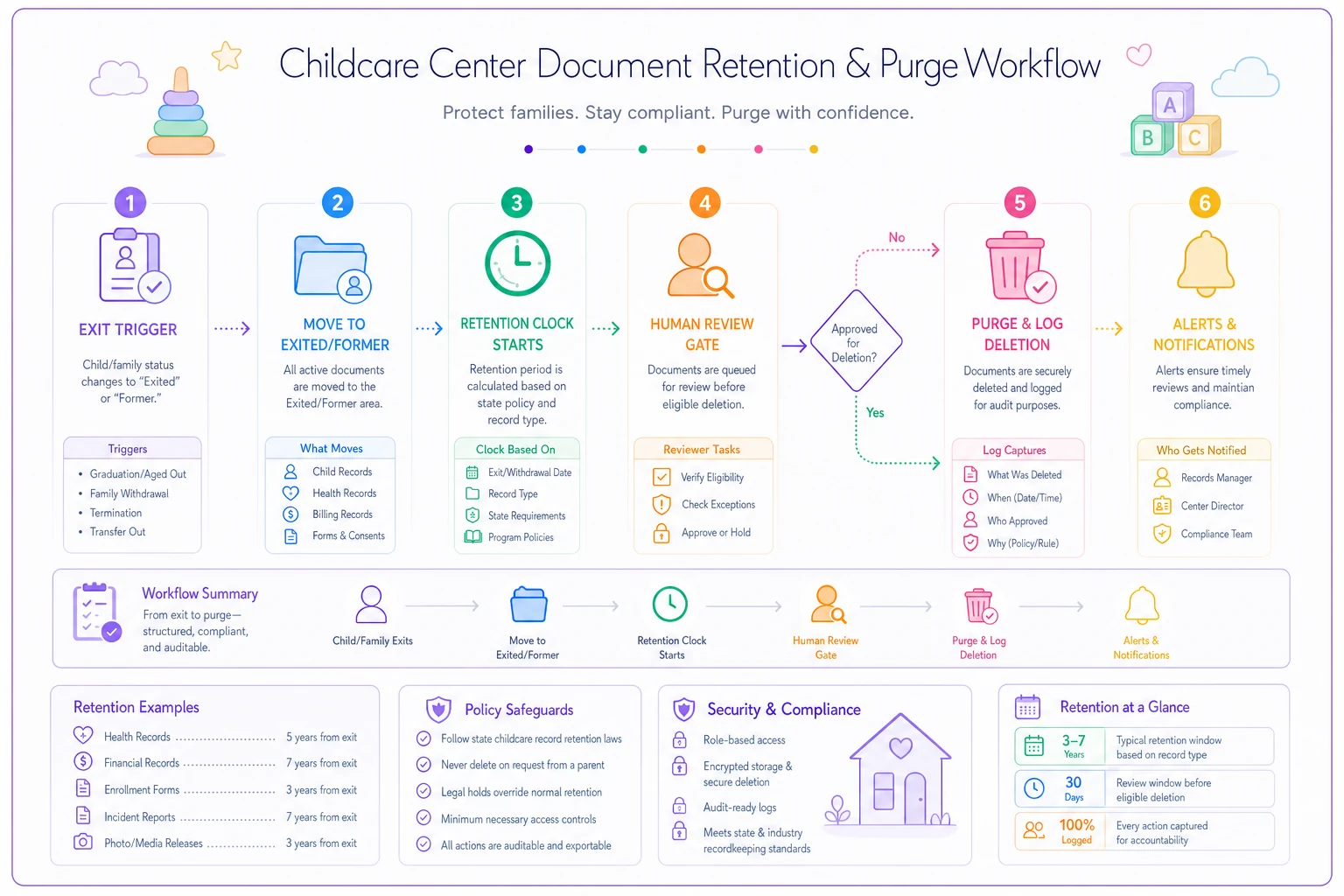
Send the admin a review task 90 days before a record hits its purge date — not a delete command.
This is where operational software earns its place — not by doing anything clever, but by watching the calendar so a stretched-thin director doesn't have to. A workflow platform that tracks each document's trigger date and surfaces "these four files are eligible for review this month" turns retention from an annual fire drill into background noise. The point isn't automation for its own sake — it's that nobody at a busy center is going to manually track 200 children's exit-plus-three-years dates in their head.
A real scenario: the gap that almost cost a subsidy contract
A two-site preschool serving around 130 kids — roughly 40% on state subsidy — got a program monitoring visit separate from their regular licensing inspection. The monitor asked for attendance records and signed subsidy eligibility forms going back three years.
Current year was fine. Year two was mostly there. Year three was a mess. When they'd migrated from paper sign-in sheets to a digital system a couple years earlier, the old paper logs got boxed up in a back closet, and about four months of eligibility forms never got scanned. The monitor flagged an incomplete-records finding, which put somewhere in the range of $8k–$11k in reimbursement under review pending correction.
They didn't lose the money, but it took the director close to three weeks of digging — re-collecting parent signatures, reconstructing attendance from both the old and new systems. Three weeks she didn't have.
After that, they rebuilt around the structure above: Active/Exited splits, a retention matrix kept inside the records cabinet, trigger-based review flags so nothing aged out silently. The next monitoring visit, the same request took about ten minutes. Same center, same paperwork volume — just a different system holding it together.
When a lighter approach makes sense — and when it doesn't
This full structure makes sense when you're running more than one classroom, you take subsidy or CACFP funding (which carry their own record demands), you've had turnover in the admin role, or you've ever spent more than an hour hunting for a single document. Those are the conditions where scattered files turn into real risk.
A lighter version is fine when you're a small home-based program with a handful of children and one consistent operator who knows where everything lives. You still need the retention periods right, but you may not need the multi-layer folder tree. Don't build bureaucracy you can't maintain.
Any center that's grown past one location, anyone preparing for accreditation, and anyone whose current "system" depends entirely on one person not quitting should not be relying on memory or a shared drive organized by year. That's not a system — that's a single point of failure wearing a lanyard.
The checklist to get audit-ready
Any center that's grown past one location, anyone preparing for accreditation, and anyone whose current "system" depends entirely on one person not quitting should not be relying on memory or a shared drive organized by year. That's not a system — that's a single point of failure wearing a lanyard.
-
[ ] Build a retention matrix listing every document type, its retention period, and its trigger event
-
[ ] Confirm each period against your state licensing rules and any funding-source requirements
-
[ ] Set up folder structures with Active vs. Exited/Former as top-level splits
-
[ ] Lock folder naming at the org level for multi-site consistency
-
[ ] Separate storage by sensitivity level, not just by year
-
[ ] Scan all paper originals and store copies digitally; keep wet-signature originals locked and fireproof
-
[ ] Set purge triggers tied to exit/termination dates, with a human review gate before deletion
-
[ ] Add pre-expiration alerts for clearances and time-sensitive records
-
[ ] Keep a destruction log (what, when, who) for anything purged
-
[ ] Test it
ask a staff member to find a random past document in under five minutes
If that last test fails, your matrix is fine on paper but broken in practice. Fix the findability before the next inspection finds it for you.
If that last test fails, your matrix is fine on paper but broken in practice. Fix the findability before the next inspection finds it for you.
Retention isn't a compliance chore you do once and forget. It's the quiet infrastructure that decides whether an audit is a ten-minute conversation or a three-week scramble. Get the triggers right, keep the structure predictable, and let the calendar do the remembering — so when someone asks for a file from three years ago, you're already reaching for it before they finish the sentence.
Ready to elevate your childcare management?
Join hundreds of childcare providers using Totsyly to save time, improve communication, and grow their centers.