


Your second location was supposed to make everything easier. Double the revenue, spread fixed costs, create advancement opportunities for staff. Instead, you're playing telephone between sites, dealing with inconsistent parent experiences, and watching quality slip while directors point fingers at each other about whose fault the latest compliance issue was.
Multi-site childcare operations playbook sounds fancy, but really it's about one thing: preventing the chaos that happens when you can't be everywhere at once.
The breakdown usually starts small. A teacher at Site B starts doing circle time differently than Site A. Parents notice. Then someone forgets to log a medication administration because Site C uses a different form. Before you know it, you're running three completely different childcare centers that happen to share a name.
The decision matrix that stops the power struggles
Every multi-site operator eventually hits the same wall: directors fighting over who gets to make what decision. Site A wants to change nap schedules. Site B thinks that's stupid. You're stuck mediating while actual problems pile up.
Central decisions (non-negotiable across all sites):
-
Tuition rates and fee structures
-
Staff compensation bands
-
Core curriculum framework
-
Safety protocols
-
Parent communication standards
-
Licensing compliance procedures
-
Brand standards and marketing
Local decisions (site director ownership):
-
Daily schedule timing (within framework)
-
Staff scheduling and coverage
-
Parent event planning
-
Classroom decoration and setup
-
Supply ordering (within budget)
-
Minor facility improvements
-
Community partnerships
Hybrid decisions (local input, central approval):
-
New program offerings
-
Significant schedule changes
-
Vendor selections
-
Hiring above certain positions
-
Discipline policies beyond basics
-
Facility modifications over $500
The specific items matter less than making sure everyone knows the boundaries before conflicts arise. When Site B's director wants to add a Spanish immersion program, she knows it needs central approval. No confusion, no resentment.
SOP library: your quality insurance policy
Most operators think SOPs are about compliance. They're actually about making sure your best director's knowledge doesn't walk out the door when they leave.
Simplify your childcare center’s daily operations.
Totsyly helps you manage enrollments, staff, and communications efficiently so you can focus on care.
- Streamlined enrollment & waitlist management
- Automated billing & payment tracking
- Staff scheduling & attendance monitoring
No credit card required
What actually needs documenting — not the 47-page employee handbook nobody reads:
Opening procedures — Not just "unlock doors." The actual 23-step process including HVAC settings, safety walks, attendance system prep, and morning health checks. One operator found their new Site C director had been skipping playground inspections for three weeks because "nobody mentioned it."
Incident response flowcharts — Not paragraphs of text. Visual flowcharts showing exactly what happens when a child gets hurt, including who calls parents, who documents, who reports to licensing, and what forms get filled when. Time it: if it takes more than 30 seconds to understand, it's too complicated.
Medication administration — Step-by-step with photos. Where meds are stored, how they're logged, who can administer, parent signatures needed, and disposal procedures. Include the edge cases like when a parent drops off medication at pickup time.
Enrollment workflows — From initial tour to first day, with every touchpoint mapped. Who sends what email when. Which forms go where. How classroom assignments happen. One center was losing roughly a third of tours because nobody followed up within 24 hours — they each assumed someone else was handling it.
Parent communication templates — Not suggested language, actual templates. Incident reports, schedule changes, fee increases, weather closures. Include timing requirements. Nothing destroys trust faster than Site A and Site B sending completely different messages about the same snow day.
Assign each SOP an owner who updates it quarterly based on what's actually happening in centers.
The mistake most operators make: writing SOPs once and forgetting them. They become fiction within six months. Your medication SOP owner should be whoever handles the most complex medication cases — not whoever has the fanciest title.
Governance layers that prevent quality drift
You can't manage quality through random site visits and hoping for the best. You need layers of oversight that catch problems before parents do.
Layer 1: Daily self-checks Each site runs through a 10-point morning checklist. Ratios met? Safety walks done? Attendance systems working? Medications logged? This isn't about trust — it's about catching the stuff that slips when someone's out sick and everyone's scrambling.
Layer 2: Weekly peer reviews Directors review each other's sites weekly, rotating who checks whom. Not inspections — collaborative walks where they share what's working. Site A's director notices Site B's clever fix for transition times. Site B's director spots that Site A's playground gate isn't latching properly.
Layer 3: Monthly operations audits Someone from central ops (or an appointed lead director) does a deeper dive monthly. Checking parent communication logs, reviewing incident trends, verifying staff certifications are current, ensuring curriculum implementation matches standards. This is where you catch the slow drift — like when teachers gradually stop doing afternoon observations because "we're too busy."
Layer 4: Quarterly parent feedback loops Not annual surveys that nobody reads. Quarterly pulse checks on specific aspects. This quarter: pickup procedures. Next quarter: communication quality. The quarter after: curriculum satisfaction. Small enough to act on, frequent enough to catch issues early.
One operator running seven sites found their newest location consistently scoring lower on parent satisfaction. The monthly audit revealed they'd been shorting afternoon ratios by one teacher for two months — not enough for parents to pinpoint the problem, but enough that something felt off.
Shared dashboards that actually drive decisions
Most multi-site operators drown in data nobody uses. You need four dashboards, updated weekly, that everyone actually looks at.
| Dashboard | Key Metrics |
|---|---|
| Occupancy | Enrollment by site/room/age, waitlist depth, tour-to-enrollment conversion, enrollment pipeline, 30-60-90 day projections |
| Staffing | Current vs. required ratios, PTO scheduled, certification expirations, overtime trends, turnover rates |
| Quality | Incident rates by site, parent communication response times, curriculum scores, licensing citations, satisfaction scores |
| Financial | Revenue collected by site, past due aging, labor cost %, supply cost per child, facilities expense trends |
The occupancy dashboard tells you when Site B's infant room will hit capacity in six weeks so you can start hiring now, not when parents are already complaining about ratios. The staffing dashboard flags when certifications are clustering around the same expiration date — which means you're headed for a compliance crunch. Don't average quality metrics across sites; if Site A has two incidents monthly and Site C has twelve, averaging to six tells you nothing useful.
One metric almost nobody tracks: revenue per square foot by site. It tells you instantly which locations are actually profitable versus just busy.
These dashboards should be visible to all directors, updated weekly, and discussed in a Monday morning huddle. Not a two-hour meeting — fifteen minutes max. What's red? What's trending wrong? Who needs help?
When operational software becomes essential
Manual tracking starts breaking down around three sites. Not because it's impossible, but because the time spent pulling data from different spreadsheets, calling sites for updates, and fixing inconsistencies eats up your entire week.
This is where AI-powered operational platforms make sense — not for flashy features, but for the basic sanity of having enrollment, staffing, compliance, and financial data in one place. When a parent calls asking why their autopay failed, you shouldn't need to call three people to find out.
The automation side matters more than people expect. Automatic parent reminders for immunization updates. Staff alerts when certifications are expiring. Enrollment workflows that route applications to the right director without you playing traffic cop. Waitlist management that actually reaches out to families when spots open.
One operator with five sites was spending roughly twelve hours a week just compiling dashboards. After moving to centralized operations software, that dropped to under an hour — not because the software was magic, but because the data was already there, updated in real time as staff worked.
The bigger value isn't efficiency, though. It's consistency. When every site uses the same intake forms, tracks incidents the same way, and follows the same communication protocols, parents get the same experience whether they're at your downtown location or your suburban site. That's how you actually scale without sacrificing quality.
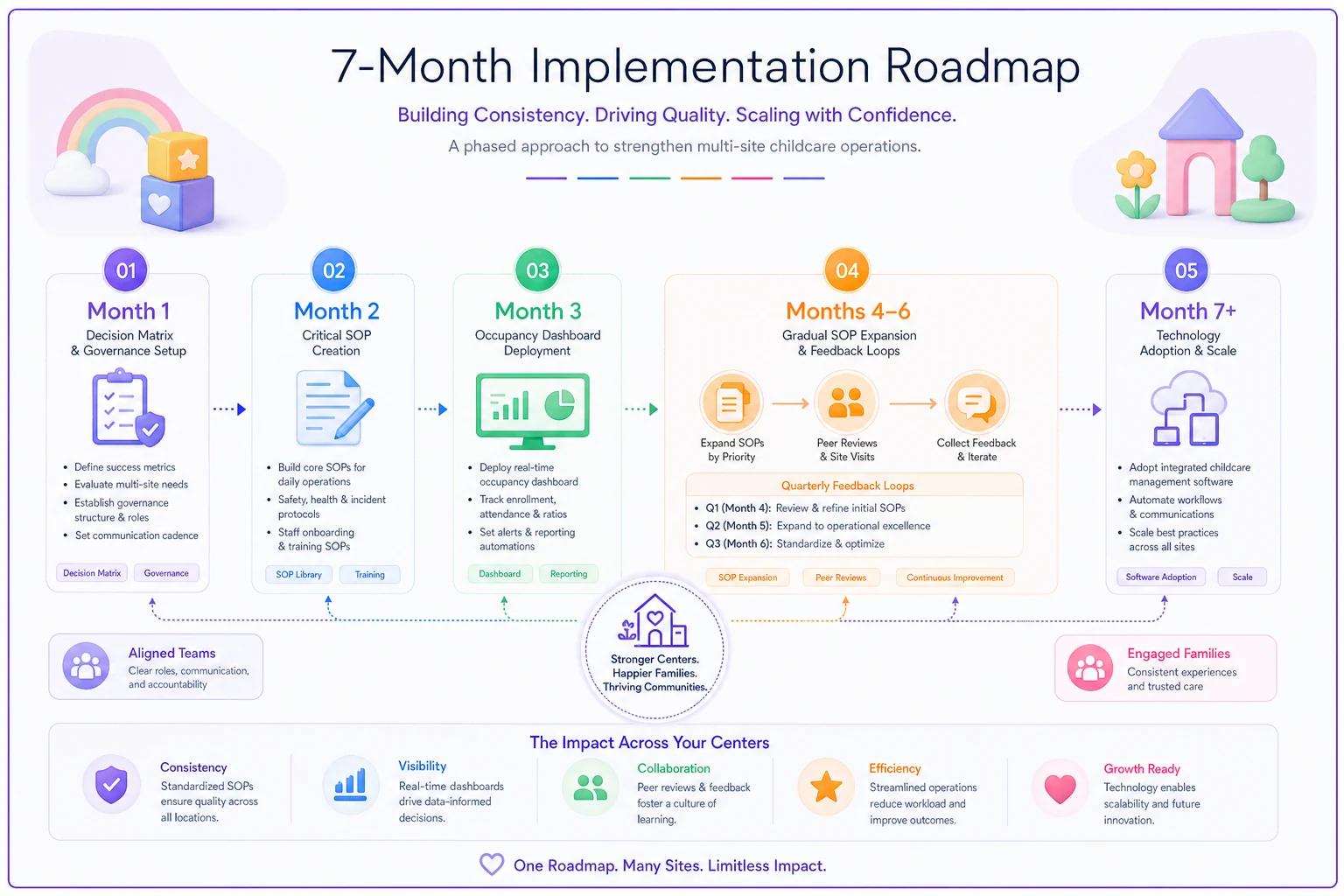
The implementation sequence that actually works
Don't try to fix everything at once. Multi-site standardization fails when you dump twenty new procedures on overwhelmed directors.
-
Month 1
Decision matrix and governance structure
— Get clarity on who owns what decisions. Start the peer review walks. Nothing else changes yet — just observe and document what's actually happening at each site. -
Month 2
Critical SOPs only
— Document the five procedures that vary most between sites. Usually medication administration, incident response, enrollment process, opening/closing procedures, and parent communication. Don't aim for perfect — aim for consistent. -
Month 3
Dashboard deployment
— Start with just the occupancy dashboard. Get everyone comfortable reviewing real numbers weekly. Add one dashboard per month until all four are running. -
Month 4–6
Gradual SOP expansion
— Add a handful of SOPs monthly, focusing on whatever's causing the most friction. Update the original five based on what you've learned. Start quarterly parent feedback loops. -
Month 7+
Technology layer
— Only now do you consider operational software. By this point you know what data matters, which processes need standardizing, and where manual work hurts most. The implementation will actually stick because it's solving real problems you've already identified — not theoretical ones a vendor promised to fix.
This sequence matters. Skipping to software in month two before you've standardized anything just digitizes your chaos.
A simple visual of this implementation sequence helps teams follow the steps.
This sequence matters. Skipping to software in month two before you've standardized anything just digitizes your chaos.
Why most multi-site operations fail (and yours won't)
The pattern is almost always the same. A successful single site opens a second location — still manageable. Then a third opens and suddenly everything's on fire. Quality drops, parents complain, staff turns over, and the owner ends up closing locations or selling to someone who actually knows how to operate at scale.
It fails because they try to run multiple sites like one bigger site. Three sites isn't three times the work — it's exponentially more complex. Different communities, different staff dynamics, different competitive pressures. You can't be everywhere, make every decision, or hold quality together through sheer willpower.
The playbook above isn't about control. It's about building systems that maintain quality when you're not there. When directors understand their decision authority, procedures are documented and actually followed, peer reviews catch problems early, and dashboards show what's really happening — that's when scaling works.
Your second site should make your operation stronger, not chaotic. Your fifth site should run as smoothly as your first. That's not wishful thinking when you have the right foundation. It's just good systems doing what they're designed to do.
Ready to elevate your childcare management?
Join hundreds of childcare providers using Totsyly to save time, improve communication, and grow their centers.