

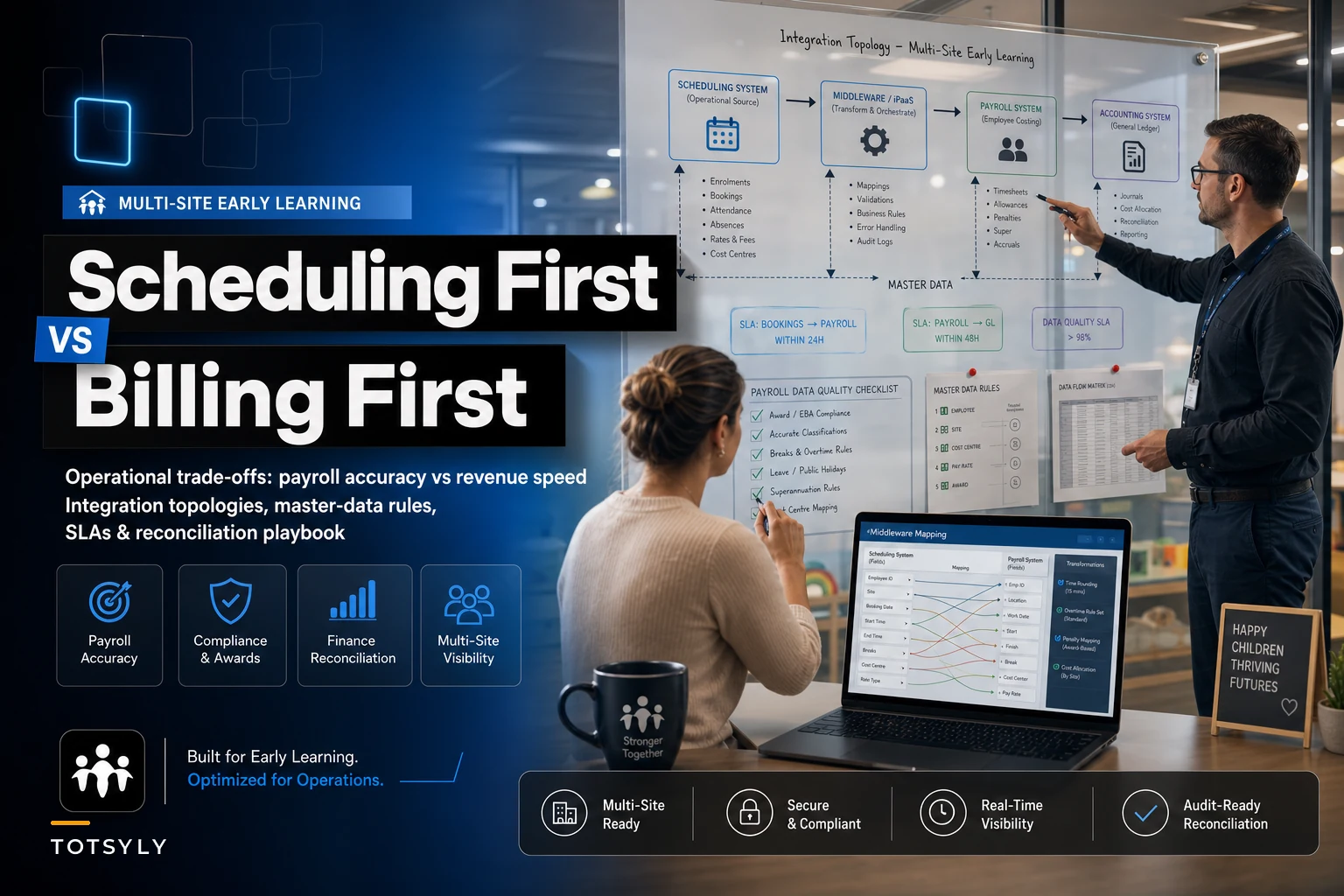

The platform you build operations around determines which problems you'll be dealing with for the next five years. Not because one approach is objectively better — both camps have solid products — but because whichever system you designate as the source of truth for a given data domain determines where your errors cluster, what month‑end close looks like, and how painful it is to answer a licensing auditor's question about a floating teacher's hours from three months ago.
Most multi‑site early learning orgs don't make this decision deliberately. They buy a scheduling tool because ratios were killing them, bolt on billing later, and spend the next two years discovering that neither system actually owns payroll — so payroll ends up living in a spreadsheet one person maintains and nobody else fully understands. Or they go billing‑first because tuition collection was leaking, then try to reverse‑engineer attendance from invoice data, which never quite matches what was actually happening in the room.
This piece is the decision framework and the plumbing diagram. It assumes you already know what scheduling and billing platforms do. What follows is the part nobody writes down: who owns which data, how handoffs should work, and what the trade‑offs actually cost downstream.
The core trade‑off, stated plainly
A scheduling‑first platform treats the shift and the attendance record as the atomic unit of truth. Everything — payroll, ratio compliance, billing — derives from "who was scheduled, who showed up, which child was in which room." Billing becomes a reporting layer on top of attendance.
A billing‑first platform treats the enrollment contract and the invoice as the atomic unit. Tuition is calculated from the enrollment agreement; attendance is a modifier (absences, drop‑ins) applied to a billing baseline. Staff scheduling is often a weaker, bolted‑on module.
The pattern worth internalizing: scheduling‑first systems tend to produce accurate payroll and clean ratio compliance, but messy revenue recognition. Billing‑first systems produce clean AR and clean revenue, but unreliable payroll and weak labor‑cost attribution.
| Dimension | Scheduling‑first master | Billing‑first master |
|---|---|---|
| Payroll accuracy | Strong — hours flow directly from shifts/clock events | Weak — payroll usually exported to a separate system, reconciled manually |
| Ratio & licensing compliance | Strong — real‑time headcount by room | Moderate — attendance exists but isn't the design center |
| Revenue recognition / AR | Moderate to weak — invoices derived, proration logic often thin | Strong — built around contracts, deferrals, late fees |
| Multi‑site labor cost attribution | Strong if sites tagged correctly | Weak — labor often not modeled per site |
| Retro edits (schedule or tuition) | Clean for hours, messy for billing restatement | Clean for billing, messy for recomputing paid hours |
| Cross‑site overtime detection | Strong — one shift ledger per employee | Poor — each site may invoice independently |
| Month‑end finance close | Harder — finance pulls from an ops‑centric model | Easier — the system is already finance‑shaped |
Everything else in this article flows from that.
Canonical "master" assignments: the single most important decision
Before picking topology, pick ownership. For every data domain, exactly one system is the master. Everyone else is a consumer. When two systems both think they own a domain, you get the classic failure: a correction made in System A that silently disagrees with System B, and no one notices until reconciliation — or an auditor — catches it.
Simplify your childcare center’s daily operations.
Totsyly helps you manage enrollments, staff, and communications efficiently so you can focus on care.
- Streamlined enrollment & waitlist management
- Automated billing & payment tracking
- Staff scheduling & attendance monitoring
No credit card required
-
Child enrollment contract → Billing system (master). Tuition rate, schedule entitlement, discounts, sibling links.
-
Daily child attendance (check‑in/out events) → Scheduling/attendance system (master). This is also your ratio‑compliance record.
-
Staff shift + worked hours → Scheduling system (master). Clock events, breaks, actual vs scheduled.
-
Staff pay rate and employment status → HR/payroll system (master). Never let scheduling own pay rates; it will drift.
-
Invoice + AR + payments → Billing system (master).
-
General ledger + revenue recognition → Accounting system (master). Both scheduling and billing feed it; neither owns it.
-
Room/site roster and licensed capacity → Compliance module or scheduling (master), depending on where inspectors look.
The mistake that quietly wrecks orgs: letting the scheduling tool store its own copy of pay rates "for convenience," then having an admin update a rate there instead of in payroll. Now two numbers exist for the same teacher. Decide the master, lock editing elsewhere, and make every other system read‑only for that field.
Integration topologies: which plumbing fits which situation
There are four realistic ways to connect these systems. The right one depends on your site count, error tolerance, and honestly how much engineering help you have access to.
-
Single‑source (one platform does everything)
-
Realtime API sync
-
Batch sync (nightly/weekly files)
-
Middleware / integration layer
One vendor's suite handles scheduling, billing, and attendance. No integration to maintain.
-
When it makes sense
1–3 sites, limited admin staff, you can live with whichever domain the suite is weak at.
-
When it's a bad idea
You need serious revenue recognition AND serious labor‑cost modeling. No single suite does both well yet.
Systems exchange records as events happen (a check‑out triggers a billing event; a shift close pushes hours to payroll).
-
When it makes sense
4+ sites, you need near‑live ratio dashboards and same‑day payroll visibility. Requires a vendor with a real API and someone to own it internally.
-
When it's a bad idea
You don't have technical ownership. Realtime failures are silent and compound fast — a dropped webhook means an invoice that never generated.
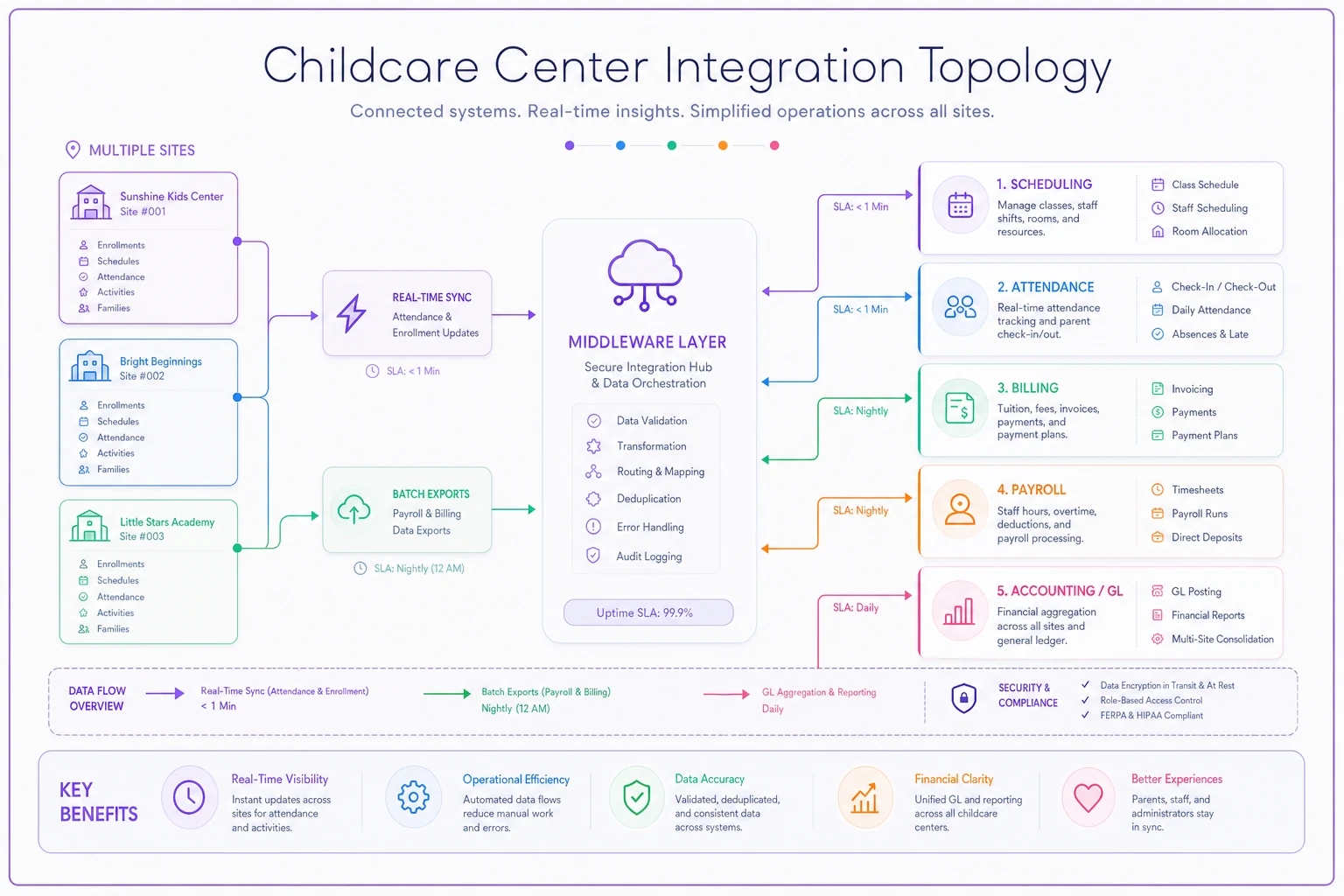
This diagram shows typical realtime and batch flows between scheduling, billing, payroll, middleware, and accounting across multiple sites.
Scheduled exports move data on a cadence — attendance to billing nightly, hours to payroll per pay period.
-
When it makes sense
Most mid‑size orgs. Batch is boring, inspectable, and easy to reconcile because you have a file to diff against.
-
When it's a bad idea
You need real‑time ratio enforcement across sites. Batch can't support live compliance.
A dedicated tool (iPaaS or a custom layer) sits between systems, holds the canonical mapping, and enforces transformation rules.
-
When it makes sense
8+ sites, multiple states, differing tuition rules, mixed funding sources. The complexity justifies a dedicated translation layer.
-
When it's a bad idea
Smaller orgs. You'll spend more maintaining the middleware than the problem it solves.
A practical pattern that tends to work: realtime for attendance and ratios (safety‑critical, must be live), batch for payroll and billing (financially critical, must be auditable). You don't need the same cadence everywhere, and mixing them deliberately is a feature, not a compromise.
Sample handoff rules (the contracts between systems)
Handoffs fail at the edges — the weird cases nobody specified upfront. Write these rules down before you integrate, not after the first bad payroll run.
-
Attendance → Billing Only billable attendance events sync. A check‑in without a matching check‑out is held in an exception queue, not billed, and flagged to the site director by 9am the next day.
-
Shift close → Payroll Hours sync only after a site director approves the day. Unapproved days don't flow. An unapproved day older than 48 hours escalates to the regional manager.
-
Enrollment change → Billing Rate changes carry an effective date. Mid‑cycle changes trigger proration using the contract's proration method, never a flat recalculation.
-
Retro edit → everything Any edit to a closed period sets a
restated=trueflag and writes an adjustment record rather than overwriting history. (More on this below — it's where most orgs are quietly non‑compliant.) -
Cross‑site shift → Payroll Hours from all sites for one employee aggregate to a single weekly total before overtime is calculated. Overtime is never computed per site.
That last rule is the one that costs real money when missed, so it's worth spending time on the multi‑site scenarios.
Multi‑site scenarios and their GL impact
Scenario A: The floating teacher
Marisol is credentialed to float between three sites. Monday she's at North, Tuesday at Central, Wednesday through Friday at South covering a maternity leave. Each site director sees her as "a sub this week" and approves her hours locally.
-
Total worked
41 hrs. Regular: 40, OT: 1.
-
Allocate regular hours to the site where worked. OT (the 41st hour, worked at South) hits South's cost center, or by policy, a shared overhead pool.
-
Sample journal entry (weekly accrual)
Dr Salaries Expense – North (8 hrs) 312.00 Dr Salaries Expense – Central (8 hrs) 312.00 Dr Salaries Expense – South (24 reg hrs) 936.00 Dr Overtime Expense – South (1 hr @ 1.5x) 58.50 Cr Wages Payable 1,618.50
The GL impact of getting this wrong isn't just the missed OT dollars — it's that your per‑site labor‑cost‑as‑%‑of‑revenue metric becomes unreliable, and you'll make bad staffing decisions based on it.
Scenario B: Cross‑site overtime that only billing‑first systems hide
In a billing‑first org, each site invoices its families independently, so the system has no reason to aggregate an employee across sites. Overtime detection becomes a manual job someone does — or doesn't do — in a spreadsheet. The failure mode: an employee works 45 total hours, no single site shows more than 40, and nobody calculates OT until a wage‑and‑hour complaint surfaces.
This is the single strongest argument for keeping staff hours mastered in scheduling even if you're billing‑first overall. The scheduling ledger is the only place one employee's full week actually lives.
Scenario C: The retro edit
A parent disputes two absence days from six weeks ago; you agree to credit them. Meanwhile a teacher's clock‑in from the same period was corrected after the fact.
Both of these touch closed periods. The wrong move — and the common one — is editing the original records so the numbers look right. That destroys your audit trail and makes your GL disagree with your subledger history.
The correct pattern: never overwrite a closed period. Write adjustments.
Billing credit (two days of tuition credit, prior period): Dr Tuition Revenue – Prior Period Adjustment 96.00 Cr Accounts Receivable / Family Credit 96.00
Payroll correction (0.5 hr added, prior period, true‑up this cycle): Dr Salaries Expense – Central (prior period true-up) 19.50 Cr Wages Payable 19.50
Each adjustment references the original record ID and carries the reason. When an auditor asks why March's revenue differs between your first report and your current report, you point at a list of dated, reasoned adjustments instead of shrugging.
Payroll monthly‑close checklist
Run this before every payroll finalization. It catches the errors that otherwise surface as angry teachers or wage claims.
-
[ ] All sites have approved every day in the pay period (no unapproved days in the queue)
-
[ ] Open attendance events (check‑in without check‑out) resolved or exception‑flagged
-
[ ] Cross‑site employees aggregated to single weekly totals before OT calc
-
[ ] Overtime recomputed on aggregated hours, not per‑site
-
[ ] Pay rates reconciled against HR master (zero rate mismatches)
-
[ ] Floating/sub hours allocated to correct cost centers
-
[ ] Prior‑period true‑ups entered as adjustments, not overwrites
-
[ ] Scheduled‑vs‑worked variance report reviewed for any shift over a threshold (e.g., >1.5 hrs)
-
[ ] PTO/leave hours reconciled against the leave balance system
-
[ ] Payroll gross total ties to GL salaries accrual within tolerance
-
[ ] Exception log signed off by regional manager
The step most people skip is the scheduled‑vs‑worked variance review.
The step most people skip is the scheduled‑vs‑worked variance review. It's the cheapest fraud‑and‑error detector available: a shift scheduled for 6 hours that clocked 9.5 is either a genuine coverage story or a forgotten clock‑out. Either way you want to know before you pay it.
Reconciliation templates
Attendance‑to‑billing reconciliation
CSV columns:
childid, siteid, servicedate, attendancestatus, billableflag, invoicelineid, billedamount, expectedamount, variance, exceptionreason
Pseudo‑SQL:
SELECT a.childid, a.siteid, a.servicedate, a.billableflag, b.invoicelineid, b.billedamount, a.expectedamount, (COALESCE(b.billedamount,0) - a.expectedamount) AS variance FROM attendance a LEFT JOIN billinglines b ON a.childid = b.childid AND a.servicedate = b.servicedate WHERE a.billableflag = true AND (b.invoicelineid IS NULL -- attended, never billed OR COALESCE(b.billedamount,0) <> a.expectedamount);
Any row returned is either lost revenue (attended, never billed) or a billing error (amount mismatch). In a scheduling‑first org this is your most important revenue‑leakage check, because derived invoices are exactly where the leakage hides.
Hours‑to‑payroll reconciliation
employeeid, payperiod, siteid, approvedhours, exportedhours, payratescheduling, payratehr, variancehours, ratemismatchflag
SELECT s.employeeid, s.payperiod, SUM(s.approvedhours) AS approvedhours, p.exportedhours, s.payrate AS ratesched, h.payrate AS ratehr, (p.exportedhours - SUM(s.approvedhours)) AS variancehours, CASE WHEN s.payrate <> h.payrate THEN 1 ELSE 0 END AS ratemismatch FROM schedulinghours s JOIN payrollexport p ON s.employeeid = p.employeeid AND s.payperiod = p.payperiod JOIN hrmaster h ON s.employeeid = h.employeeid GROUP BY s.employeeid, s.payperiod, p.exportedhours, s.payrate, h.payrate HAVING (p.exportedhours - SUM(s.approvedhours)) <> 0 OR s.payrate <> h.pay_rate;
The rate_mismatch column is the canary for the "scheduling stored its own pay rate" problem. If it ever returns rows, your master‑ownership discipline has already broken somewhere.
SLA examples and KPIs for the handoffs
Integrations without SLAs degrade quietly. Attach a measurable commitment and an owner to each handoff.
| Handoff | SLA | KPI target |
|---|---|---|
| Attendance → billing sync | Within 24 hrs of check‑out | ≥ 99% events billed within SLA |
| Shift approval → payroll | All days approved by period close −1 day | 0 unapproved days at finalization |
| Exception resolution | Open attendance events cleared in 48 hrs | Exception backlog < 1% of events |
| Pay‑rate reconciliation | Zero mismatches per close | 0 rate mismatches |
| Retro edits | Logged as adjustments, same day | 100% of prior‑period edits carry adjustment records |
| Finance close | Subledger ties to GL within tolerance | Variance < 0.5% of monthly payroll/revenue |
The KPI that quietly predicts everything else is exception backlog. When unresolved exceptions creep above a couple percent, it means a site isn't working the queue — and that's the leading indicator for both a bad payroll run and a rough audit month.
A short real scenario
A four‑site preschool group ran billing‑first, with scheduling in a lightweight tool and payroll stitched together in a spreadsheet each pay period. Their recurring pain: payroll took one administrator the better part of two days per cycle, and roughly once a quarter a floating teacher's overtime got missed — eventually surfacing as back‑pay corrections and a nervous conversation about wage‑and‑hour exposure.
They didn't switch platforms. They changed three things: made scheduling the single master for staff hours, set an aggregate‑by‑employee‑then‑allocate rule before any OT calculation, and added the hours‑to‑payroll reconciliation query as a mandatory close step. Within a couple of pay cycles, payroll prep dropped from two days to roughly half a day, and the cross‑site OT misses stopped because aggregation was happening in one place instead of four. Nothing exotic — just deciding who owns the number and not letting two systems argue about it.
How to actually decide
If you're starting fresh or consolidating, work backward from your biggest risk:
-
If labor compliance and ratios are your scariest exposure — scheduling‑first, and treat billing as a derived layer with a hard attendance‑to‑billing reconciliation.
-
If revenue leakage and messy AR are your scariest exposure — billing‑first, but carve out staff hours and keep them mastered in scheduling regardless.
-
If you're multi‑state with mixed funding — assume middleware, because your transformation rules will differ per jurisdiction and you'll want them in one maintainable place.
Who should not force a single‑source suite: any org past three or four sites that needs both strong revenue recognition and real per‑site labor costing. You'll outgrow the weaker half of the suite within a year and end up integrating anyway — better to plan the topology now.
The platforms are a choice about where your problems live, not whether you'll have them. Decide the master per domain, write the handoff rules down, reconcile on a cadence you actually keep, and treat retro edits as adjustments rather than rewrites. Do those four things and it genuinely stops mattering much which camp your platform came from — which is the whole point.
The platforms are a choice about where your problems live, not whether you'll have them. Decide the master per domain, write the handoff rules down, reconcile on a cadence you actually keep, and treat retro edits as adjustments rather than rewrites. Do those four things and it genuinely stops mattering much which camp your platform came from — which is the whole point.
Ready to elevate your childcare management?
Join hundreds of childcare providers using Totsyly to save time, improve communication, and grow their centers.