


Running a childcare center means managing an absurd amount of sensitive information. Emergency contacts, medical records, behavioral observations, incident reports, billing details, staff background checks—the list keeps expanding. Most centers store this data across at least a dozen different places: paper files, shared drives, messaging apps, billing software, parent communication platforms, and random spreadsheets that somehow became mission-critical.
The real problem isn't just the volume. Childcare data governance requirements are stricter than almost any other small business sector. You're handling information about minors, which triggers specific privacy laws. Parents expect transparency but also complete security. State licensing boards demand accessibility during audits but penalize improper retention. And your staff needs quick access to critical information while maintaining strict limits around who sees what.
What makes this particularly hard is that childcare centers operate with thin margins and limited IT resources. You can't exactly hire a Chief Privacy Officer when you're trying to maintain proper ratios and keep tuition affordable. Yet the consequences of poor data governance hit harder in childcare than most industries. A single privacy breach can destroy parent trust overnight. One missing consent form can trigger a licensing violation. Improper data retention can turn a routine incident into a legal headache years down the road.
Why traditional small business data practices fail in childcare settings
Most small business data advice completely misses the unique dynamics of childcare operations. Generic guidance about "keeping customer records secure" doesn't account for the fact that you're managing data for multiple stakeholders with conflicting needs. The parent who pays tuition isn't always the person authorized for pickup. The child's medical information needs to be accessible to classroom teachers but not billing staff. Incident reports require immediate parent notification but also long-term retention for potential legal issues.
A typical childcare center generates somewhere around 200–300 distinct data points per child per month—daily attendance, meals, naps, diaper changes, activities, observations, photos, incident reports, medication logs, and parent communications. Multiply that across 60–80 enrolled children and you're managing tens of thousands of data points monthly, each with different access requirements, retention schedules, and privacy implications.
What really breaks most centers is the intersection of operational needs and privacy requirements. Teachers need immediate access to allergy information during snack time. Float staff need to know behavioral triggers when covering a classroom. Administrative staff need billing details but shouldn't see medical records. Parents want real-time updates but panic if another family accidentally sees their child's information.
Traditional file cabinets and folder structures can't handle this complexity. Neither can basic cloud storage with simple password protection. You need actual governance—clear rules about who accesses what, when data gets deleted, how consent is documented, and what triggers parent notification.
The hidden risks multiplying across your enrollment records
Here's how data governance failures actually cascade in childcare settings. A teacher takes photos during a classroom activity and posts them to the center's private parent app. Seems fine. But one family has a custody situation where the non-custodial parent isn't supposed to have access to the child's location or schedule. Another family never signed the photo release form—it got lost during enrollment. A third child in the background has parents who explicitly opted out of digital sharing.
Simplify your childcare center’s daily operations.
Totsyly helps you manage enrollments, staff, and communications efficiently so you can focus on care.
- Streamlined enrollment & waitlist management
- Automated billing & payment tracking
- Staff scheduling & attendance monitoring
No credit card required
That single photo just created three potential legal issues, and this kind of thing happens multiple times daily across typical centers. The teacher had no bad intent. They were trying to engage parents and document learning. But without clear governance structures, every well-meaning staff action becomes a privacy minefield.
The scariest part is retention creep. Centers hold onto everything because they're terrified of not having documentation when needed. It's not unusual to find immunization records from kids who aged out years ago, incident reports from 2015 still sitting in filing cabinets, and background checks from employees who left long ago. Each piece of unnecessarily retained data increases breach risk and audit complexity.
Then there's the shadow IT problem. When official systems are too restrictive or complicated, staff find workarounds. Teachers start texting parents directly. Administrators keep their own spreadsheets with sensitive information because the official database is slow. The billing coordinator stores payment details in their email drafts for "easy access." These shadow systems operate completely outside your governance framework and create massive blind spots.
Building access roles that match real classroom dynamics
Effective childcare data governance starts with understanding actual workflow patterns, not theoretical org charts. The lead teacher needs different access than the afternoon floater. The cook needs allergy information but not behavioral plans. The billing coordinator needs payment details but not medical records. Yet most centers either give everyone access to everything or lock things down so tight that staff can't do their jobs.
A practical role structure that actually works in real centers looks something like this:
Classroom Teachers (Primary)
-
Full access
Daily reports, observations, incident logs for assigned classroom
-
Read-only
Medical alerts, allergy lists, emergency contacts for assigned classroom
-
No access
Other classrooms' detailed records, billing information, staff records
Float Staff and Substitutes
-
Temporary access
Basic safety information for covered classroom
-
Read-only
Allergy lists, emergency contacts, critical behavioral notes
-
No access
Historical records, detailed observations, family financial information
Administrative Staff
-
Full access
Enrollment documents, billing records, parent contact information
-
Limited access
High-level classroom metrics without individual child details
-
No access
Detailed behavioral observations, medical records beyond required forms
Directors and Assistant Directors
-
Full access
All operational data with audit trails
-
Override capability
Emergency access provisions with documentation
-
Retention authority
Decisions on data deletion and archival
The key is making these roles systematic, not situational. When someone covers a different classroom, their access should automatically adjust. When a child transitions rooms, the data permissions should follow. When staff leave, access should terminate immediately—not whenever someone remembers to change the passwords.
Creating retention schedules that balance compliance and common sense
Most centers either keep everything forever or delete things randomly when they run out of filing space. Neither is a strategy. Proper retention schedules protect you legally while reducing unnecessary data exposure. The challenge is that different data types have wildly different requirements.
Immediate Deletion (After Purpose Fulfilled)
-
Daily activity logs after parent notification
-
Routine photos after sharing period ends
-
Temporary substitute access logs
-
Draft documents and working copies
Short-term Retention (6–12 months)
-
Routine parent communications
-
Non-incident behavioral notes
-
Classroom supply requests
-
Staff scheduling records
Medium-term Retention (3 years)
-
Enrollment applications
-
Tuition payment records
-
Attendance records
-
General incident reports
-
Parent consent forms
Long-term Retention (7+ years)
-
Immunization records
-
Serious incident reports
-
Background check documentation
-
Financial records for tax purposes
-
Licensing audit materials
Permanent or Until Age 23
-
Injury reports requiring medical attention
-
Suspected abuse documentation
-
Special needs assessments
-
Legal correspondence
Automate retention flags in your systems so expired items surface without manual review.
The trick is automating these schedules rather than relying on manual processes. No one has time to review filing cabinets monthly to purge expired documents. Digital systems should flag items for deletion automatically, with override options for special circumstances. When retention becomes a background function rather than a manual chore, it actually gets done.
Consent templates that actually cover modern operations
Generic consent forms from a decade ago don't cover how childcare centers actually operate now. You're not just asking permission to take photos anymore. You're managing digital communications, third-party app access, virtual learning platforms, automated notifications, and AI-enhanced developmental tracking. Each requires specific consent language that parents can actually understand.
Photo and Media Consent
-
Internal use (classroom displays, memory books)
-
Marketing use (website, social media, brochures)
-
Parent app sharing (specific platform named)
-
Third-party use (local newspaper, community newsletters)
-
Opt-out process and alternatives
Digital Communication Consent
-
Approved communication channels
-
Message types and frequency
-
Emergency notification methods
-
Marketing message preferences
-
Unsubscribe mechanisms
Data Sharing Consent
-
Health department reporting
-
State licensing access
-
Emergency medical provider access
-
Transition to elementary school
-
Third-party service providers (be specific)
Observation and Assessment Consent
-
Developmental screening tools
-
Behavioral tracking methods
-
Video monitoring disclosure
-
AI-assisted assessment tools
-
External specialist evaluations
Don't bury everything in one massive form that parents sign without reading. Break consents into logical groups, use plain language, and provide clear examples of what each consent actually means in practice. Most importantly, make consent withdrawal easy and honor it immediately.
Basic encryption and security practices that non-tech staff can actually follow
Telling childcare workers to "implement 256-bit encryption" is useless. They need practical security measures that fit into their daily routines without requiring a tech background. The best security practices are basically invisible to users—they just work.
Password Requirements That Stick
-
Unique passwords for each system (use a password manager)
-
Automatic logout after 15 minutes of inactivity
-
No password sharing, even during staff shortages
-
Biometric options where available (fingerprint/face recognition)
-
Regular forced password changes (every 90 days)
Document Security Without Complexity
-
Cloud platforms with automatic encryption
-
No sensitive data in email bodies (use secure links)
-
Locked filing cabinets for necessary paper records
-
Clean desk policy at end of shift
-
Shredding protocols for disposed documents
Device Management
-
Center-owned devices only for sensitive data
-
No personal phones for work photos
-
Automatic screen locks on all devices
-
Remote wipe capability for lost devices
-
Regular software updates (automate where possible)
Physical Security Integration
-
Locked offices for records storage
-
Visitor logs for anyone accessing data areas
-
Security cameras covering records rooms
-
Key card access tracking
-
Clear badge identification for all staff
The goal isn't perfect security—it's appropriate security that staff will actually maintain. Overly complex systems lead to workarounds that create bigger vulnerabilities than the original risk.
Parent notification workflows that build trust instead of anxiety
Parents expect transparency about their child's data, but they also panic easily. A notification that says "security update required" sends some of them into overdrive, imagining hackers stealing their child's information. Effective parent notification requires thought around timing, tone, and clarity.
| Scenario Type | Examples | Recommended Format |
|---|---|---|
| Routine Notifications | Annual policy updates, new platform rollouts, consent renewals | Email with clear subject, bullet points, no urgent language |
| Operational Changes | Staff access changes, new vendor partnerships, system migrations | Email plus app notification, FAQ section, implementation timeline |
| Privacy Incidents | Unauthorized access, data breach, lost devices | Immediate app notification, then email, then paper notice with clear next steps |
The notification cascade matters enormously. For serious incidents, you want parents hearing from you first—not from parking lot conversations or Facebook groups. Draft templates in advance for common scenarios. Test your notification systems regularly. Have a clear escalation path for parents who want more information.
Track notification effectiveness through response rates and follow-up questions. If every privacy notice generates dozens of panicked phone calls, your messaging needs work. Parents should feel informed and reassured, not confused and alarmed.
The real cost of manual governance (and why it always fails eventually)
Manual data governance in childcare is like trying to count raindrops during a storm. You might catch some, but you'll miss most, and you'll exhaust yourself trying to.
-
Morning sign-ins generate attendance records
-
Breakfast requires allergy checks
-
Circle time needs current enrollment lists
-
Diaper changes create health logs
-
Lunch means more allergy verification
-
Nap time generates sleep tracking
-
Afternoon activities need photo consent checks
-
Pick-up requires authorization verification
-
Evening closing includes securing all records
Each touchpoint involves multiple staff members accessing, creating, or modifying data. Manual governance means someone physically checking every interaction for compliance. That's impossible at scale, so centers default to either over-permissive access or constant approval bottlenecks.
The breaking point usually comes during audit season or after a privacy incident. Suddenly you need to prove who accessed what, when, and why. Manual systems can't provide that audit trail. Paper logs get lost or filled out inconsistently. Memory fails. The scramble to reconstruct data governance retroactively consumes weeks and still leaves gaps.
This is where modern childcare management platforms with built-in governance features become genuinely useful—not because technology solves everything, but because it makes good governance sustainable. Automated access controls, audit trails, retention scheduling, and consent tracking transform data governance from a full-time job into a background process that actually runs. AI-powered operational software can handle the monitoring and flagging that no one realistically has time to do manually, surfacing access anomalies or overdue deletions without requiring someone to go looking for them.
Moving from reactive scrambles to proactive governance
Strong childcare data governance isn't about perfection—it's about consistency. Start with the highest-risk areas: medical information, custody restrictions, and financial data. Build basic protections there before expanding to other data types.
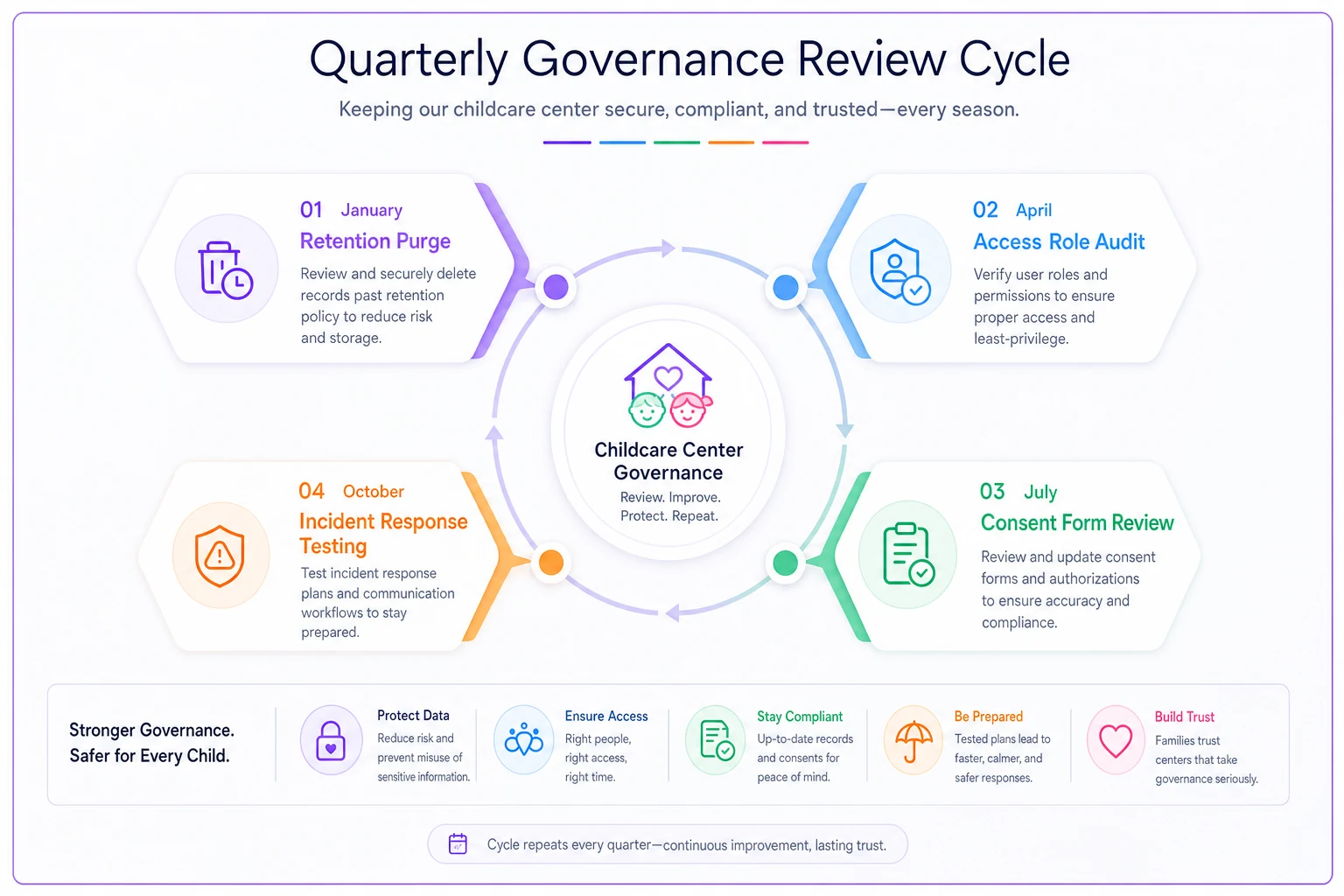
Create a quarterly governance review rhythm:
-
January
Update retention schedules and purge expired data
-
April
Review access roles and adjust for staff changes
-
July
Audit consent forms and update templates
-
October
Test incident response procedures
Here's a simple cycle to keep reviews routine.
Document everything in simple language that new staff can understand. Your data governance shouldn't live in one person's head or require an IT background to implement. When governance becomes part of operational rhythm rather than a special project, it actually holds.
Involve parents as partners rather than problems. When they understand how you protect their children's information, they become advocates rather than adversaries. Share governance improvements in newsletters. Make privacy protection part of your center's value proposition.
The centers that thrive going forward will be the ones that treat data governance as seriously as they treat child safety—because increasingly, they're the same thing. Every photo shared, every record stored, every notification sent shapes parent trust and regulatory standing. Get it right, and data governance becomes invisible. Get it wrong, and it becomes everything.
Building comprehensive childcare data governance takes time, but the alternative—a major breach, a failed audit, or a parent lawsuit—takes far more. Start with the basics, automate what you can, and improve continuously.
Ready to elevate your childcare management?
Join hundreds of childcare providers using Totsyly to save time, improve communication, and grow their centers.