


Most childcare software gets sold on features. The actual decision that matters never shows up in the demo: what does the platform treat as its source of truth? Some systems are built outward from the staff schedule and attendance clock. Others are built outward from the billing ledger and parent invoices. Everything else — payroll exports, subsidy reconciliation, compliance reporting — gets bolted onto whichever core came first.
That bias doesn't announce itself when you're three centers running payroll off a spreadsheet. It announces itself at month‑end when you're seven centers, half your revenue is subsidy‑funded, and your finance lead is manually reconciling attendance rows against authorized hours at 9pm on the 3rd because the numbers don't tie.
This is a comparison piece because the trade‑off is genuinely a fork in the road. Pick the wrong core for your revenue mix and you inherit a specific, predictable set of errors. Here's how to map them.
The two design philosophies, and what they're actually optimizing
A scheduling‑first platform treats the shift, the ratio, and the attendance punch as the atoms of the system. Children check in, staff clock in, ratios get enforced, and the schedule drives everything downstream. Billing is usually derived — the system looks at attendance or enrollment and generates charges from there.
A billing‑first platform treats the invoice, the enrollment contract, and the payment as the atoms. Tuition plans, fee schedules, subsidy agreements, and AR live at the center. Attendance exists, but it's often a lighter module that feeds billing rather than driving payroll or ratio logic with any real depth.
Neither is wrong by default. The problem is that early learning organizations have two hard dependencies that pull in opposite directions:
-
Payroll accuracy and ratio compliance need precise attendance and shift data. Scheduling‑first wins here.
-
Revenue integrity and subsidy reconciliation need tight billing, fee schedules, and authorized‑hour tracking. Billing‑first wins here.
You need both to be excellent. One core is only ever excellent at one. That gap is where the operational cost lives.
Where each core silently fails you
The failures aren't dramatic. They're small data mismatches that compound until someone spends a day untangling them.
Simplify your childcare center’s daily operations.
Totsyly helps you manage enrollments, staff, and communications efficiently so you can focus on care.
- Streamlined enrollment & waitlist management
- Automated billing & payment tracking
- Staff scheduling & attendance monitoring
No credit card required
Scheduling‑first downstream failures
-
Subsidy hours get derived from attendance instead of authorizations. A child is authorized for 30 subsidy hours a week. They attend 36. A scheduling‑first system that bills off attendance will quietly over‑bill the agency 6 hours, which gets clawed back later — or it under‑collects from the parent for the private‑pay gap.
-
Fee schedule complexity gets flattened. Sibling discounts, part‑time pro‑ration, registration fees, late pickup charges — billing‑light modules tend to handle two or three of these cleanly and force manual overrides on the rest.
-
Retroactive attendance edits don't flow to billing. A teacher corrects a check‑in three days later. Payroll catches it. The already‑sent invoice doesn't.
Billing‑first downstream failures
-
Attendance is too thin for payroll. You get a daily present/absent flag, not shift‑level clock data with breaks, overtime thresholds, and shift codes. Payroll then becomes a manual reconstruction.
-
Ratio compliance isn't enforced in real time. Because the system doesn't think in shifts, it can't flag a ratio breach as it happens — it only knows enrollment counts, not who's physically in the room.
-
Staff coverage changes don't reconcile against labor cost. A floater covers two rooms across three centers in a week. Billing‑first systems rarely track that cleanly enough for accurate cross‑site payroll allocation.
A side‑by‑side of the error profiles
| Dimension | Scheduling‑first core | Billing‑first core |
|---|---|---|
| Payroll accuracy | Strong — clock data is native | Weak — attendance often too thin |
| Ratio/compliance enforcement | Real‑time, shift‑aware | Lagging, enrollment‑based |
| Subsidy hour tracking | Often derived (risky) | Native to authorizations (safer) |
| Fee schedule / discount logic | Frequently flattened | Strong, rules‑based |
| AR and collections | Secondary, manual‑heavy | Native and robust |
| Month‑end reconciliation effort | High on the revenue side | High on the labor side |
| Typical remediation cost per error | $40–$120 in staff time to trace a subsidy mismatch | Similar, but clustered around payroll runs |
The table makes the trade obvious: you're choosing which half of month‑end hurts.
A decision rubric: scheduling‑first, billing‑first, or best‑of‑breed
Most vendors won't give you this straight. Pick based on your revenue structure and operational complexity, not the slickest demo.
Lean scheduling‑first when:
-
Your staffing is complex — multiple shift types, floaters across sites, overtime exposure, tight ratio margins.
-
Payroll is your biggest monthly headache and largest controllable cost.
-
Your billing is relatively simple
mostly private‑pay, flat tuition, few subsidy streams.
Lean billing‑first when:
-
A meaningful share of revenue is subsidy or voucher‑funded, with authorized‑hour limits that must be honored exactly.
-
Your fee structure is genuinely complicated — tiered discounts, pro‑ration, multiple program rates.
-
AR management and collections are where money actually leaks.
Go best‑of‑breed with middleware when:
-
You're past roughly five or six sites and both halves are complex.
-
You have mixed revenue (say, 40%+ subsidy and complex private‑pay) plus cross‑site staffing.
-
You already have — or can justify — someone who owns the integration layer, because middleware without an owner becomes shadow debt fast.
The best‑of‑breed path is the honest answer for most growing multi‑site organizations, and it's also the one that quietly fails when nobody treats the sync itself as a system that needs monitoring. The enrollment‑to‑finance connection is where this tends to break first, which we've broken down in more depth in the enrollment‑to‑finance operating model for childcare centers.
When best‑of‑breed is a bad idea
Don't do it if you can't name the person responsible for the integration. A two‑system setup with no owner is worse than a single mediocre core, because now your errors hide between two systems where nobody looks. Smaller organizations — three or four sites, one bookkeeper — are usually better served picking the single core that matches their revenue mix and living with the manual edge cases on the margins.
Minimum data sync fields and cadence
If you do run two systems, the sync is the whole game. The failure is almost never "the data didn't move." It's "the data moved but the fields didn't match." These are the fields that actually need to tie, and how often they need to move.
Attendance and labor (scheduling → payroll/finance):
-
Attendance rows with child ID, date, check‑in/check‑out timestamps
-
Staff clock records with employee ID, shift code, site ID, break duration
-
Ratio snapshots tied to room and timestamp
Billing and subsidy (billing ↔ everything):
-
Employee IDs mapped consistently across both systems (this is the one everyone gets wrong)
-
Authorized subsidy hours per child, per week, with effective dates
-
Fee schedule version and effective date
-
Enrollment contract terms and pro‑ration rules
Sync cadence:
-
Attendance and clock data
daily, same‑day if payroll runs weekly
-
Subsidy authorizations
on change, never batch‑delayed — a stale authorization is a guaranteed clawback
-
Fee schedules
on change, with the effective date carried through so retroactive edits are possible
-
Full reconciliation pull
weekly, so month‑end isn't the first time anyone looks
The single most common breakage: employee and child IDs that don't match across systems. One system uses an internal auto‑number, the other uses a legacy code, and the sync "works" but attaches hours to the wrong person once a month. Pin a canonical ID in one system and treat the other as a follower.
Automated controls that protect payroll and compliance
Manual month‑end checking doesn't scale past a few sites. These are the automated checks worth building or demanding from a vendor, in rough priority order.
The general flow looks something like this: an attendance event fires, it gets matched against clock records and subsidy authorizations the same day, any mismatch triggers a routed alert to the named owner, and corrections get logged before they can silently alter a closed period. Simple in theory. Most organizations only get half of it working because they build the alerts but skip the routing and logging.
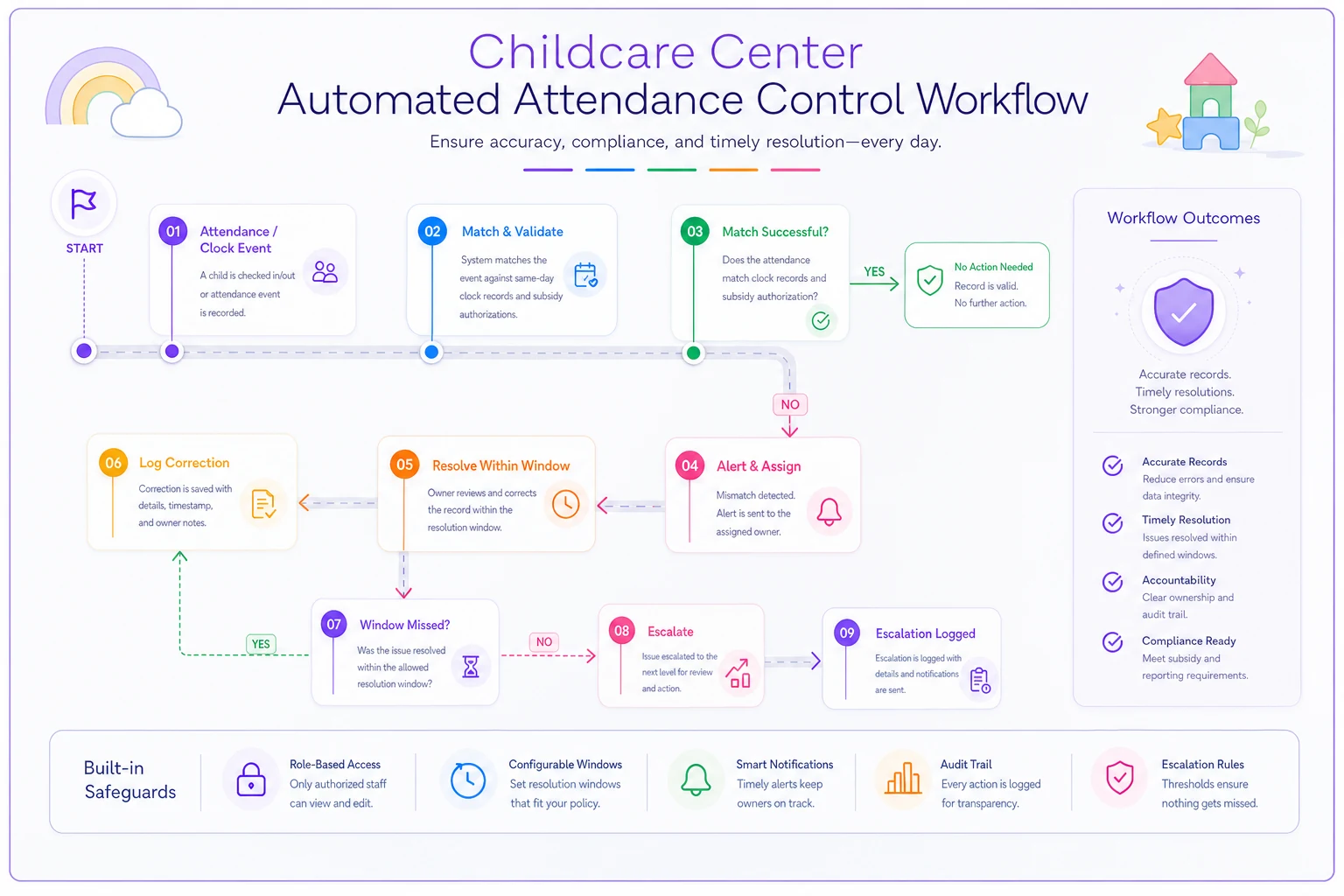
The diagram shows the event → match → alert → resolution flow in context.
-
Attendance → pay auto‑validation. Every payroll line gets matched against clock records. Any shift with no matching attendance, or attendance with no matching pay, gets flagged before the run, not after.
-
Subsidy hour mismatch alerts. When billed subsidy hours exceed authorized hours for any child, flag it the day it happens — not at reconciliation. This single alert prevents the most expensive error category in subsidy‑heavy centers.
-
Retroactive adjustment flags. Any edit to attendance, shift codes, or fee schedules after the period closes gets tagged, logged, and routed for review so it doesn't silently change a closed number.
-
Ratio breach logging. Shift‑level ratio snapshots stored and flagged, so compliance has a timestamped record rather than a reconstruction.
-
Cross‑site labor allocation checks. Floater hours that span sites get validated against site budgets so cost lands in the right place.
The pattern across all five: catch the error at the moment of entry or event, not at reconciliation. Every error that survives to month‑end costs roughly three to five times more staff time to trace than one caught the day it happened.
A practical exception workflow
Roles:
-
Site lead — owns attendance and clock corrections for their center
-
Finance/bookkeeper — owns billing, subsidy, and payroll exceptions
-
Operations manager — owns cross‑site and policy‑level exceptions
The workflow, in practice:
An alert fires — say, a subsidy hour mismatch. It routes automatically to the finance owner with the child, the authorized hours, and the billed hours attached. Finance reviews within a defined window, ideally same business day for subsidy since those have external deadlines. If it's a simple data correction under a set dollar threshold, finance fixes it and logs the reason. If it crosses a threshold or touches a closed period, it escalates to operations for approval before anything changes.
Approval thresholds that tend to work:
-
Corrections under ~$100 and within the open period
fixed by the role owner, logged
-
Corrections ~$100–$500 or touching a recently closed period
second‑person sign‑off
-
Anything above ~$500, or any subsidy clawback exposure
operations manager approval, documented
Escalation trigger: any exception unresolved after two business days escalates automatically. Subsidy mismatches get a shorter clock because the agency deadline doesn't move for you.
The point isn't the exact dollar thresholds — it's that every exception has a named owner, a resolution window, and a sign‑off requirement. Exceptions that float between departments with no owner are the ones that turn into audit findings.
KPIs and SLA targets worth holding
You can't manage the sync or the reconciliation if you're not measuring whether it's working.
A tight set of metrics:
-
AR days target under 10–15 days for private‑pay. Creeping AR days usually signals a billing‑core or collections gap before it signals a parent‑payment problem.
-
Billing‑vs‑contract variance the gap between what contracts say you should bill and what you actually billed. Hold it under ~1–2%. Anything higher means fee schedule or pro‑ration logic is breaking somewhere.
-
Allowable subsidy reconciliation variance target near zero — ideally under 1% of subsidy revenue. Subsidy variance is the one that comes back as a clawback, so it earns the tightest SLA.
-
Payroll exception rate share of payroll lines that required a manual correction. Under 2–3% is healthy; above 5% means your attendance‑to‑pay handoff is leaking time every run.
-
Sync SLA attendance synced same‑day, authorizations synced within hours of change, reconciliation complete by a fixed day each month — not "whenever finance gets to it."
Sync SLA: attendance synced same‑day, authorizations synced within hours of change, reconciliation complete by a fixed day each month — not "whenever finance gets to it."
A short real scenario
A six‑site preschool group, roughly 45% subsidy revenue, ran a strong scheduling‑first platform and loved it for ratio enforcement and payroll. The problem showed up in subsidy reconciliation: because billing derived subsidy hours from attendance, kids attending over their authorized hours were quietly over‑billed to the agency. Three reconciliations in a row produced clawbacks in the range of $4k–$7k each, plus around a day and a half of finance time per month untangling which child, which week, which authorization.
They didn't rip out the system. They added authorized‑hour fields as the billing driver, built a mismatch alert that fired the day attendance exceeded authorization, and assigned same‑day resolution to the bookkeeper. Within two cycles the clawbacks dropped to near zero and month‑end subsidy reconciliation went from roughly a day and a half to a couple of hours. The fix wasn't a new platform — it was making authorizations, not attendance, the source of truth for subsidy billing.
Common integration failure modes and how to blunt them
Mismatched IDs across systems. Pin one canonical ID set and make the other follow. Audit the mapping quarterly.
-
Mismatched IDs across systems. Pin one canonical ID set and make the other follow. Audit the mapping quarterly.
-
Stale subsidy authorizations. Sync on change, never on batch. A day‑old authorization is a clawback waiting to post.
-
Retroactive edits that don't propagate. Require effective dates on every fee and authorization change, and flag any edit to a closed period.
-
Silent sync failures. A sync that errors quietly is worse than one that fails loudly. Alert on zero records moved — an empty successful sync is almost always a broken one.
-
No owner for the middleware. Assign it. Unowned integrations rot.
Assign it. Unowned integrations rot.
Where this leaves you
The scheduling‑first versus billing‑first choice isn't about which platform is better. It's about which half of your month‑end you're willing to manage by hand — and whether your revenue mix makes that acceptable. Scheduling‑first organizations pay in subsidy and billing reconciliation. Billing‑first organizations pay in payroll reconstruction and ratio blind spots. Best‑of‑breed buys you both strengths and hands you an integration you now have to own.
Decide based on where your real money and real risk sit. If subsidy and complex fees dominate, let billing anchor the system and feed it clean attendance. If staffing complexity and ratio exposure dominate, anchor on scheduling and make authorizations — not attendance — drive your subsidy billing. Either way, the controls that save you aren't the ones that clean up at month‑end. They're the ones that catch the mismatch the day it happens, route it to a named owner, and keep your closed numbers closed.
Decide based on where your real money and real risk sit. If subsidy and complex fees dominate, let billing anchor the system and feed it clean attendance. If staffing complexity and ratio exposure dominate, anchor on scheduling and make authorizations — not attendance — drive your subsidy billing. Either way, the controls that save you aren't the ones that clean up at month‑end. They're the ones that catch the mismatch the day it happens, route it to a named owner, and keep your closed numbers closed.
Ready to elevate your childcare management?
Join hundreds of childcare providers using Totsyly to save time, improve communication, and grow their centers.