

Most childcare centers don't have a CISO. They have a director who's already covering a classroom, a part-time bookkeeper, and a software vendor whose support line closes at 5. So when a breach happens — a phishing email that got someone into your enrollment portal, a lost laptop with family records, a billing system that got hit — the people who have to respond are not technical. They're operators.
That's the core problem with most breach guidance. It's written for companies with security teams. It talks about forensic imaging and threat actor attribution and legal privilege as if a preschool director has any of that on speed dial. Meanwhile the clock is ticking, parents are starting to ask questions, and your state may have a notification deadline you don't even know about.
A childcare data breach response plan that actually works has to assume the opposite: no deep IT expertise, limited staff, and a director who needs to know exactly what to do in the first hour without guessing. This is that plan — role-based, checklist-driven, built so someone non-technical can execute it under pressure.
What a breach actually looks like at a center
Forget the Hollywood version. In real operations, a childcare breach usually starts small and quiet:
-
A staff member clicks a link in an email that looks like it's from your billing provider, enters login credentials, and now someone else is inside your parent portal.
-
A front-desk tablet with saved logins gets stolen out of a car.
-
A former employee still has access to a shared Google Drive full of enrollment PDFs — immunization records, SSNs on subsidy paperwork, custody documents.
-
Your childcare management vendor emails you that their systems were breached, and your families' data may have been exposed.
That last one matters more than centers realize. A significant share of breaches at small centers aren't the center's fault at all — they happen at a vendor. But the parents are your parents, and they'll expect you to explain it. Your plan has to cover both scenarios because your obligations to families are similar either way.
The data at stake is genuinely sensitive: children's dates of birth, home addresses, medical and allergy info, custody arrangements, parent SSNs from subsidy applications, payment details. This isn't a marketing list leaking. It's the kind of information that, in the wrong hands, creates real safety and financial risk for families — which is why calm, structured execution matters more than speed.
Assign roles before anything happens
The single biggest reason breach response goes sideways at a center: nobody knew who was supposed to do what, so everyone did a little of everything and nothing got done well. Someone deleted an email "to be safe" and destroyed evidence. Someone told a parent "don't worry, it's nothing" before anyone knew what happened.
Simplify your childcare center’s daily operations.
Totsyly helps you manage enrollments, staff, and communications efficiently so you can focus on care.
- Streamlined enrollment & waitlist management
- Automated billing & payment tracking
- Staff scheduling & attendance monitoring
No credit card required
| Role | Who typically fills it | What they own during an incident |
|---|---|---|
| Incident Lead | Center director / owner | Calls the shots, tracks the timeline, decides when to notify |
| Containment Point | Whoever has admin access to systems | Locks accounts, resets passwords, disables access |
| Evidence Keeper | Assistant director / office manager | Preserves records, screenshots, logs — touches nothing else |
| Communications Lead | Director or designated staff | Sends approved messages to parents, staff, regulators |
| Vendor Liaison | Whoever manages your software contracts | Contacts affected vendors, gets their incident details in writing |
You don't need five different people. A small center might have the director covering three of these roles. The point is that each function has a clear owner so tasks don't fall through the cracks or get done twice. Write the names and cell numbers on a laminated card in the office. When something happens, you won't want to be searching your email for who manages the billing system login.
Laminate a card with the role owners and their cell numbers and keep it in the office so it's available during an incident.
One thing worth flagging: the person with the most system access is often the worst choice for Incident Lead, because they'll be heads-down on containment. The Lead needs to be watching the whole situation, not buried in password resets.
The first hour: a containment checklist anyone can run
The goal in the first hour isn't to fix everything or figure out exactly what happened. It's to stop the bleeding and preserve what you'll need later.
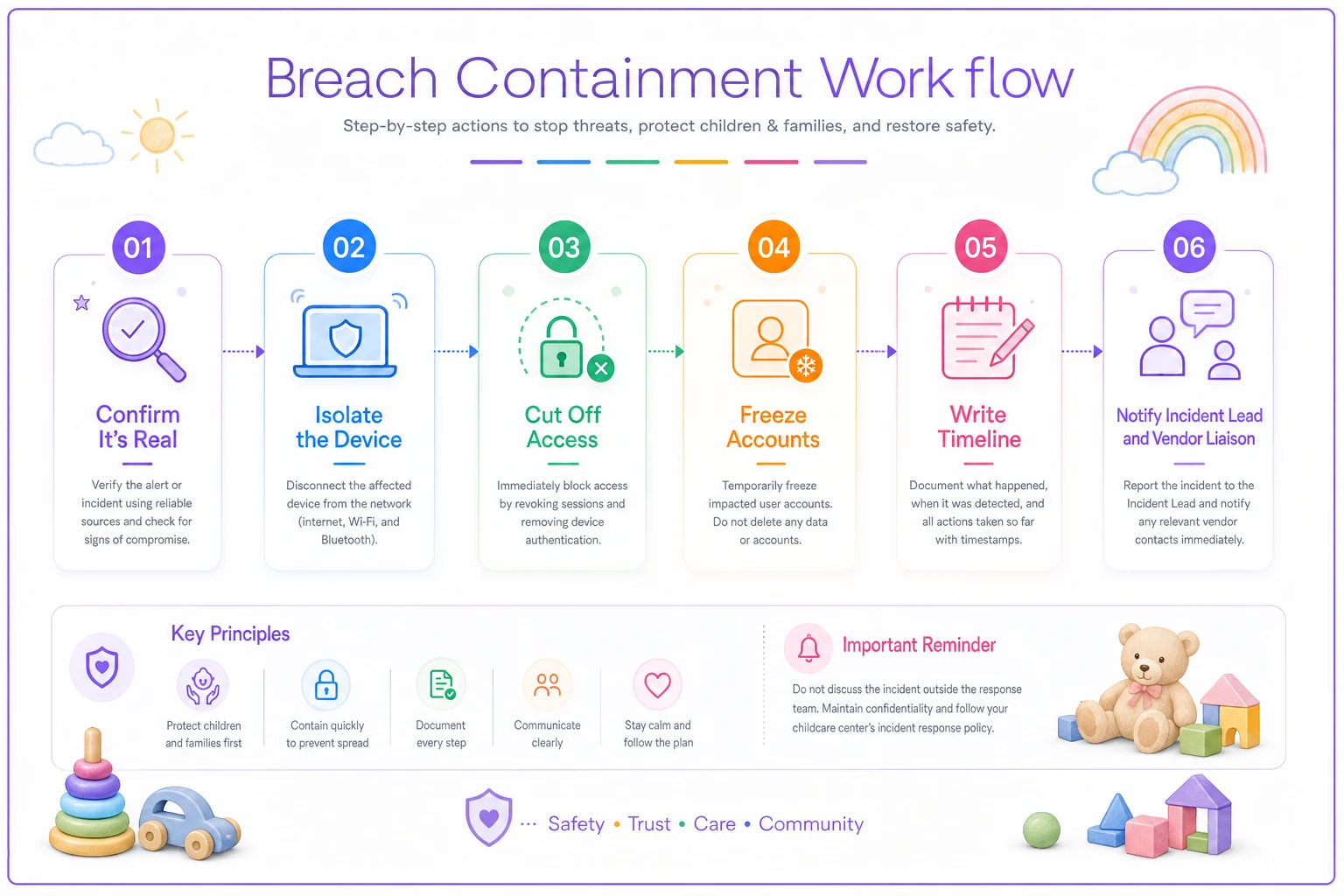
Follow this simple sequence — it's designed so a non-technical director can run it under pressure.
-
Confirm it's real. Is this an actual breach or a false alarm? A suspicious email isn't a breach until someone acted on it. Don't skip this step — over-reacting to a phishing attempt that nobody clicked wastes hours.
-
Isolate, don't destroy. Disconnect the affected device from wifi. Do not wipe it, factory reset it, or "clean it up." That destroys evidence. Set it aside, powered on if possible.
-
Cut off access. Change passwords on the affected system and any account that shared that password. Enable two-factor if it wasn't already on. Remove access for anyone who shouldn't have it — especially former staff.
-
Freeze the accounts, not the paper trail. Lock compromised accounts but don't delete emails, messages, or files. You'll need them.
-
Write down what you know. Start a simple timeline
what happened, when you noticed, what you did and when. Timestamps matter later.
-
Notify your Incident Lead and Vendor Liaison. If a vendor is involved, contact them immediately and ask them to confirm the scope in writing.
Print this list. Tape it inside a cabinet door in the office. The whole value of a checklist is that it works when adrenaline is high and clear thinking isn't.
A common mistake: staff trying to be helpful by "investigating." Someone logs into the compromised account to look around, which changes logs and can tip off an intruder. Containment first, curiosity later.
Evidence preservation without being a forensics expert
You're not building a court case. But you might need to prove to a regulator, an insurer, or a family's attorney what happened and how you responded. Your cyber insurance policy — if you have one — almost certainly requires you to preserve evidence to get coverage.
-
Screenshot everything. The suspicious email with full headers visible. The unfamiliar login. The vendor's notification. Error messages. Save them somewhere the breach didn't touch — a personal phone, a separate account.
-
Don't delete, don't clean. No wiping devices, no emptying trash folders, no tidying up the affected system.
-
Keep the timeline document going. Every action, with a time. "10:14am — disabled billing portal admin account. 10:22am — called vendor support."
-
Save the physical thing. If a laptop or tablet was involved, bag it and store it. Note who had it and when.
-
Preserve access logs if you can. Most childcare platforms and email systems keep a login history. Export it or screenshot it before it rolls off.
The centers that struggle here are the ones with everything scattered across personal Gmail accounts, texts, and paper folders. When you can't reconstruct what happened, you can't prove you responded reasonably — and that distinction is often the difference between a manageable incident and a liability nightmare. This ties directly into having solid data governance with clear roles and retention rules in place before anything goes wrong, so records are already organized when you need them fast.
Pre-approved messaging: write it before you need it
Without pre-written messaging, here's what usually happens: a breach occurs, panic sets in, and the director either says nothing for three days — which erodes trust — or fires off an emotional message that overpromises, admits fault prematurely, or leaks details that shouldn't be public yet.
Parent notification (initial). Short, honest, non-technical. Acknowledges an issue, says what you're doing, tells parents what — if anything — they should do right now, like watching statements or resetting a password. Does not speculate on cause or assign blame before you know.
Staff notification. Tells your team what happened at a high level, what they should and shouldn't do, and — critically — that they should not discuss it publicly or on social media. One staff member posting "OMG our system got hacked" on Facebook can turn a contained incident into a reputational fire.
Regulator notification. Many states have breach notification requirements, and childcare has its own layer of licensing oversight. You don't need to memorize the statute, but your plan should include which agency to notify, the deadline (some are as tight as a few days), and a template that states the facts plainly.
A point most centers miss: you often can't tell parents everything on day one because you don't know everything yet. That's fine. An initial "we identified an issue, we've contained it, we're investigating and will update you by [date]" is far better than silence — and far safer than guessing. Set an update cadence and hold to it.
Keep the tone factual and calm. Parents forgive centers that handle problems transparently. They don't forgive being kept in the dark or finding out from someone else.
When to bring in outside help — and when not to
Not every incident needs a lawyer and a forensics firm. Knowing the difference saves both time and money.
-
Sensitive personal data — SSNs, medical records, custody documents — was likely exposed.
-
You have cyber insurance. Call them first, because they often require you to use their approved vendors, and going rogue can void coverage.
-
The scope is unclear and you can't confirm what was accessed.
-
A regulator notification is legally required and you're unsure of the wording.
You can probably handle it in-house when:
-
A phishing email was received but nobody clicked or entered credentials.
-
A single non-sensitive account was compromised and quickly locked with no data access.
-
It's a near-miss you caught early with no actual exposure.
Who should not try to handle a serious breach alone: a solo director with no insurance, no legal contact, and confirmed exposure of children's medical or family financial data. That's the scenario where a few hundred dollars for an attorney call prevents a five-figure problem. Don't let pride or budget anxiety talk you out of it.
The post-incident cadence: fixing what let it happen
Containment ends the emergency. It doesn't fix the hole. The centers that get breached twice are the ones that closed the ticket and moved on without changing anything.
-
Within 48 hours Finish your timeline document while memories are fresh. Confirm all compromised access is fully revoked.
-
Within 1 week Hold a short debrief with the roles involved. What worked? Where did the plan slow you down? What did you not have that you needed?
-
Within 2 weeks Close the specific gap. If it was a shared password, move to individual logins with 2FA. If it was a former employee's lingering access, audit all access and build an offboarding checklist. If it was a vendor, review their security terms.
-
Within 30 days Update the playbook itself based on what you learned. A breach that improves your plan is at least partly redeemed.
-
Ongoing Quarterly access reviews and an annual walkthrough of the plan so roles stay fresh.
This is also the moment to look at your incident and liability posture more broadly — a single breach usually reveals whether your overall risk-management and insurance controls are keeping up with the data you actually hold.
A real scenario
A two-site preschool with around 140 families enrolled got a call from a parent who noticed their child's enrollment PDF — including the parent's SSN from a subsidy form — showing up somewhere it shouldn't. The source turned out to be a shared Google Drive folder that three former staff members still had access to. Nobody had ever revoked it.
Their first instinct was to delete the folder — which would have destroyed the evidence of who had accessed what. Fortunately the director paused, took screenshots of the sharing permissions and access history first, then removed access. Total contained window: just over an hour.
The gap that let it happen was straightforward offboarding hygiene — no process to pull access when someone left. In the two weeks after, they built a one-page offboarding checklist, moved sensitive documents out of loosely shared drives, and audited every account. The cleanup cost them roughly a day and a half of admin time and a short call with their insurer. Had they deleted everything upfront, they'd have had no way to show the exposure was limited — and no defensible answer for the affected family or the licensing agency.
The outcome wasn't dramatic, and that's the point. A quiet, well-handled incident is exactly what a good plan produces.
Where software fits — quietly
Most of this plan is process, not technology. But a few things get dramatically easier when your operational records already live in one organized, permissioned system rather than scattered across drives, inboxes, and paper folders.
Childcare management platforms with built-in access controls and audit logs mean that when you need to answer "who accessed this and when," the answer already exists. Role-based permissions mean former staff lose access at offboarding instead of lingering for months. Centralized records mean evidence preservation isn't a scavenger hunt.
The tools don't replace the runbook — they just remove the friction that makes breaches worse. A director shouldn't have to reconstruct a timeline from memory or dig through five personal accounts to figure out what happened. When the underlying system is organized and permissioned from the start, the response plan actually works the way it's supposed to.
Start before you need it
The worst time to write a breach response plan is during a breach. Everything in this playbook — the role assignments, the containment checklist, the message templates, the remediation cadence — takes maybe an afternoon to set up and costs nothing but attention. But it only works if it exists before the incident, printed and assigned, sitting in a cabinet where a stressed director can grab it and follow the steps.
You're not trying to become a security expert. You're trying to make sure that when something goes wrong with your families' data, the response is calm, fast, and defensible — and doesn't depend on anyone being technical. That's what an operations-first plan gives you: a way to handle the worst day in a way that protects the families who trusted you with their kids' information, and protects the center you've built.
You're not trying to become a security expert. You're trying to make sure that when something goes wrong with your families' data, the response is calm, fast, and defensible — and doesn't depend on anyone being technical. That's what an operations-first plan gives you: a way to handle the worst day in a way that protects the families who trusted you with their kids' information, and protects the center you've built.
Ready to elevate your childcare management?
Join hundreds of childcare providers using Totsyly to save time, improve communication, and grow their centers.