

Most multi-site childcare groups don't fail at technology adoption because they picked the wrong platform. They fail because they treated the rollout as an IT event instead of an operational change that touches every teacher, lead, and front-desk person across every building. The software goes live, directors get trained, a few champions get excited, and then three months later half your centers are still running the old paper binder "just in case." The data in the new system is now unreliable because it's only half-populated, and nobody trusts a dashboard that's missing a third of the real activity.
The gap you're fighting isn't technical. It's the distance between "the system exists" and "the system is how we actually work here." A 6–9 month adoption program exists to close that gap deliberately, site by site, role by role, instead of hoping it closes on its own. This is the part that migration planning usually skips. If you've already read through a technology migration playbook, think of this as the people-and-process layer that sits on top of the data-and-systems layer.
Why adoption breaks across sites (and not just at one)
A single-site rollout can survive on willpower. The director walks the floor, catches the people still doing it the old way, and corrects them in real time. You don't need a formal program — you need one determined person and a few weeks.
Multi-site is a different animal. What breaks is consistency of enforcement. Across operators running four or more sites, adoption follows the director, not the software. A center with an engaged lead hits 90%+ usage within a few weeks. A center with an overwhelmed lead covering ratios three days a week never gets past 40%, and nobody notices until a licensing visit or a billing reconciliation surfaces the mess.
A typical scenario looks like this: a six-site group rolls out digital attendance and check-in. Four sites adopt cleanly. Two don't. Those two keep using paper sign-in sheets as the "real" record and enter data into the system at the end of the day — if someone remembers. Now you have two problems. First, your ratio and attendance data is unreliable at those sites. Second, the staff there are doing the work twice, which quietly builds resentment toward the whole system. When you later try to run payroll or state reporting off that data, the gaps turn into hours of manual cleanup.
The pattern underneath all of this: adoption is uneven by default, and unevenness compounds. A system that's 70% adopted across sites isn't 70% useful — it's closer to 30% useful, because you can't trust any cross-site number when you don't know which sites are reporting real activity.
Start with a pilot, and define what "passing" actually means
The most common mistake is skipping the pilot or running one so loosely that it proves nothing. "We turned it on at one center and it seemed fine" is not a pilot. A pilot is a controlled test with acceptance criteria you write down before you start, so you can't move the goalposts when you're emotionally invested in going live.
Simplify your childcare center’s daily operations.
Totsyly helps you manage enrollments, staff, and communications efficiently so you can focus on care.
- Streamlined enrollment & waitlist management
- Automated billing & payment tracking
- Staff scheduling & attendance monitoring
No credit card required
Pick a pilot site that's representative, not your best one. Your strongest center with your most tech-comfortable director will adopt anything — which tells you nothing about the rest of the portfolio. Pick a middle-of-the-road site with normal staffing pressure and a director who's competent but busy.
-
Usage depth At least 85% of daily check-ins/check-outs happen in the system (not entered after the fact) for 10 consecutive business days.
-
Role coverage Every role that's supposed to touch the system has logged in and completed their core task at least once — teachers logging incidents, leads approving timecards, front desk processing enrollment.
-
Error rate Fewer than 2 data-correction tickets per 100 transactions in the final pilot week.
-
Parallel-run exit Paper backup fully retired for at least 5 business days with no operational gap.
-
Staff confidence check A short pulse survey where at least 70% of pilot staff say they'd rather keep the new system than go back.
If the pilot doesn't clear these, you don't roll out. You fix what's broken at one site — which is cheap — instead of discovering it at six sites, which is expensive and damages trust in the whole initiative.
Role-based training beats "everybody gets the same session"
Group training where you sit forty staff in a room and walk through every screen is the most wasteful thing you can do. The teacher who only needs to log attendance and the occasional incident sits through twenty minutes of billing configuration she'll never touch, and tunes out the eight minutes that actually matter to her.
Build training around what each role actually does on a normal shift. Keep it short, keep it task-based, and let people practice in a sandbox, not a slideshow.
| Role | What they actually need to learn | Depth | Format |
|---|---|---|---|
| Classroom teacher | Check-in/out, incident logging, daily notes to parents | Shallow, high-frequency | 20-min hands-on + laminated card |
| Classroom lead | Everything above + ratio monitoring, timecard review | Medium | 45-min session + shadowing |
| Front desk / admin | Enrollment, tour scheduling, payment entry, family comms | Deep on their modules | 2× 45-min + live practice week |
| Site director | Reporting, approvals, exception handling, staff oversight | Deep across modules | Half-day + ongoing office hours |
| Regional / owner | Cross-site dashboards, KPI review, remediation decisions | Strategic, not transactional | Separate session, dashboard-focused |
The insight most operators miss: teachers don't need more training, they need less friction. If the daily task takes more taps than the paper version, no amount of training fixes it. For frontline roles, training should be ruthlessly narrow — three things, done fast, practiced until it's muscle memory. Save the depth for the handful of people who actually configure and monitor the system.
One more thing worth doing early: tie system training into your existing onboarding so new hires learn it as "how we work here," not a bolt-on. New staff who never saw the paper process adopt fastest. Within a year, if your onboarding is right, the new-system-is-normal population quietly becomes your majority.
Embed the SOPs, don't just publish them
This is the step almost everyone skips. They roll out software but leave the written SOPs pointing at the old process. So the laminated procedure by the classroom door still says "sign the paper roster," the system says something else, and staff default to whatever's physically in front of them. The SOP and the software are now in conflict, and the SOP wins because it's the thing taped to the wall.
Every workflow the software touches needs its SOP rewritten to match the new system — same language, same field names, same sequence. Treat it as a change-control exercise, not a documentation afterthought.
-
Process name & trigger — "Child check-in, on arrival"
-
Old step being replaced — "Parent signs paper roster"
-
New step — "Staff taps child's name in [system], confirms time"
-
System of record — explicitly state the new system is the official record; paper is retired
-
Exception path — what to do if the tablet is down (and how to backfill)
-
Role responsible — who owns this step on each shift
-
Effective date & sign-off — director signs, dates, posts
The exception path matters more than people expect. The number one reason paper survives is "what do we do when the wifi's down?" If the SOP doesn't answer that cleanly, staff keep paper as a permanent safety net — and permanent safety nets become the real process. Give them a defined, temporary fallback with a backfill rule, and you kill the excuse.
This SOP discipline also connects to how you govern technology across the portfolio. If you've built out a technology governance framework with vendor SLAs, your adoption SOPs should reference the same ownership and escalation structure, so there's one consistent chain of accountability instead of each site inventing its own.
Adoption KPIs: measure behavior, not logins
Logins are a vanity metric. Someone can log in daily and still do all the real work on paper. What you want to track is whether the system is capturing actual operational activity.
Build a small dashboard — five or six numbers, reviewed weekly during the rollout, monthly once things stabilize. The point is to spot laggard sites early, while fixing them is still cheap.
-
Real-time capture rate — % of transactions entered during the event vs. backfilled later. Low real-time capture is your earliest warning that paper is still the real process.
-
Active-user ratio — % of expected users completing their core task weekly, by role.
-
Correction/rework rate — how often entries get edited or deleted, which flags training gaps or bad data at entry.
-
Module coverage — are all intended modules live, or did a site quietly adopt check-in but ignore incident reporting?
-
Time-to-entry — how long after an event the record appears. Rising time-to-entry at a site usually means staff are falling back to old habits.
The pattern to watch for: one site drifting while the dashboard looks fine in aggregate. Averages hide your problem sites. Always view adoption KPIs site-by-site, never as a portfolio blur. A group average of 82% can easily be four sites at 95% and two sites at 55% — and those two sites are where your data quality, compliance exposure, and staff frustration all live.
Remediation loops: what to do when a site falls behind
Measuring adoption is useless if nothing happens when a site lags. The remediation loop is what turns a red number into an action, and then verifies the action worked. Without it, your dashboard just documents failure in real time.
A practical remediation checklist when a site drops below target:
-
[ ] Diagnose the cause — is it a device problem, a training gap, a director who's checked out, or an SOP conflict? Don't assume; go look.
-
[ ] Watch a shift — spend an hour on the floor at that site. Nine times out of ten the real reason is obvious in person and invisible on a report.
-
[ ] Re-train the specific role that's lagging — not everyone, just the role with the gap. Short, targeted, hands-on.
-
[ ] Check the hardware — a dead tablet or a bad charging setup kills adoption faster than any attitude problem.
-
[ ] Confirm the SOP matches reality — if the posted procedure still references paper, fix it that day.
-
[ ] Assign a site champion — someone on-site, not a regional, who owns daily nudging for two weeks.
-
[ ] Set a 14-day recheck — re-pull the KPI. If it's green, close the loop. If not, escalate to the director's manager.
What makes remediation actually work is the recheck with a date on it. Loops that don't close just become suggestions. If a site misses its recheck twice, that's no longer an adoption problem — it's a management problem, and it gets handled through the director's chain, not the software rollout.
A realistic adoption timeline
Roughly how a 6–9 month program sequences for a portfolio of five to eight sites:
-
Month 1 — Pilot setup. Pick the representative site, write acceptance criteria, rewrite the SOPs for the pilot's workflows, build the sandbox.
-
Month 2 — Run the pilot. Role-based training, parallel run, daily KPI checks, fix friction fast.
-
Month 3 — Pilot evaluation & template lock. Did it clear the acceptance criteria? Finalize SOP templates and training materials based on what you learned.
-
Months 4–6 — Phased rollout. Two or three sites at a time, not all at once. Each wave uses the locked templates and hits its own acceptance gate before paper retires.
-
Months 6–8 — Remediation & stabilization. Work the laggard sites through remediation loops. Shift KPI review from weekly to monthly as sites go green.
-
Month 9 — Normalize. Fold the system fully into onboarding, retire the parallel processes everywhere, and hand ongoing KPI monitoring to the regional review cadence.
Here's a quick visual of the phased rollout workflow.
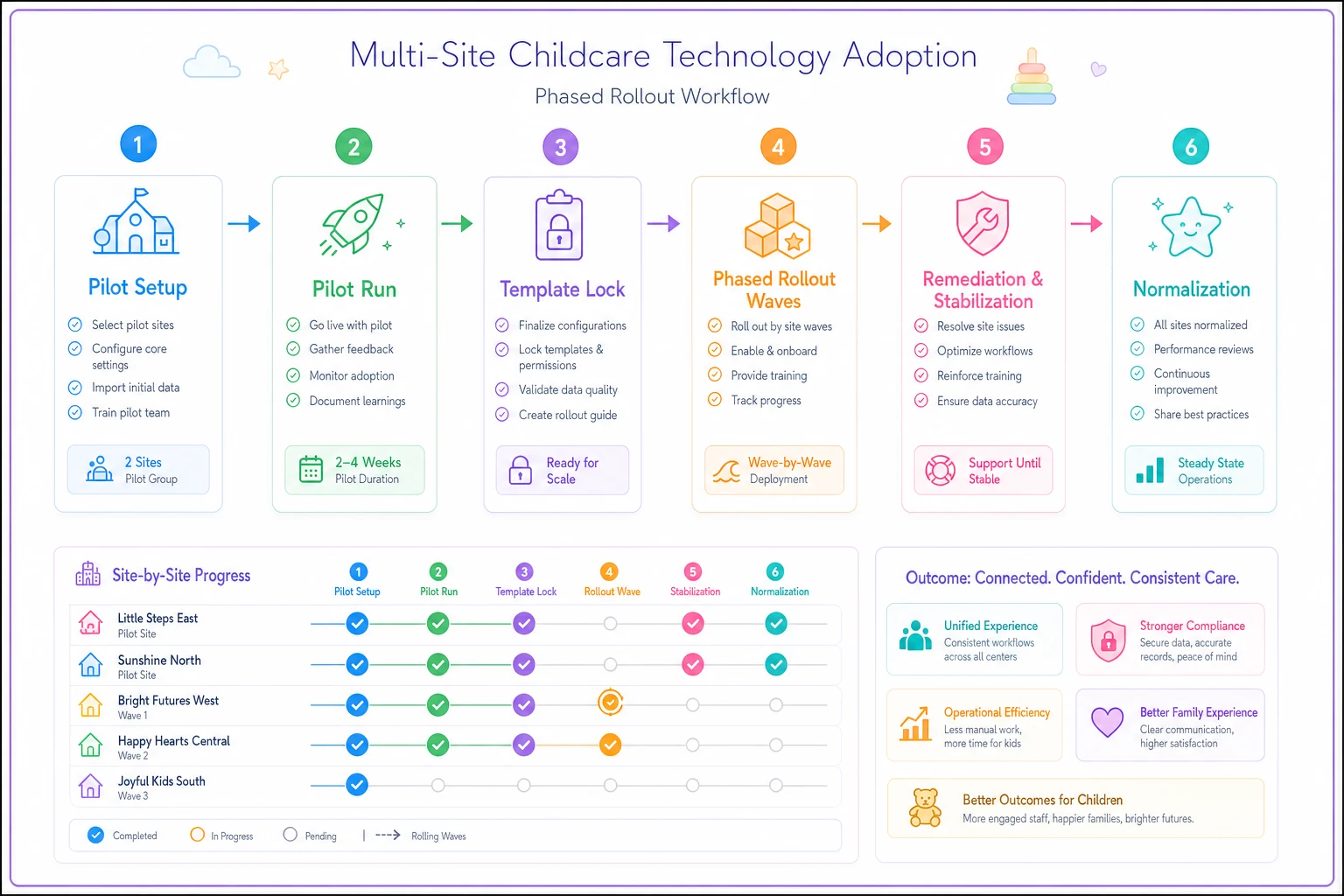
Phasing is the deliberate choice here. Operators who flip every site live on the same day do it to "rip off the band-aid," and it almost always backfires — because when four sites have problems simultaneously, you can't give any of them real attention, and all four conclude the system is broken.
A short real scenario
A five-site preschool group rolled out a combined attendance, billing, and parent-communication platform. Their first attempt — all sites live at once, one big group training — stalled badly. Three months in, real-time check-in capture across the group was around 55%, billing reconciliation was taking a staffer most of two days every cycle to fix mismatches, and two directors were openly running paper alongside.
They reset and ran it as a phased program instead. One pilot site, written acceptance criteria, SOPs rewritten to name the actual system fields, and training split by role. The pilot took about six weeks to clear its gates. Then they rolled out two sites at a time with the same acceptance bar before retiring paper at each.
By roughly month seven, real-time capture across all five sites was consistently in the low 90s, and billing reconciliation had dropped from close to two days a cycle down to a few hours. The number that mattered most to the owner wasn't on any dashboard: directors stopped asking to keep the paper backup, because the system had become the easier way to work — not the extra thing on top of it.
When this level of structure makes sense — and when it doesn't
This makes sense when you're running three or more sites, when adoption has already stalled on a previous rollout, or when your data feeds something that can't tolerate gaps — state reporting, payroll, billing. The more places your operational data flows downstream, the more a half-adopted system costs you.
This is overkill when you're a single site with an engaged owner on the floor every day. You don't need a 9-month program and a KPI dashboard to get one building using one system — you need a week of hands-on correction and a willingness to retire the paper. Formalizing it would just add bureaucracy to something willpower can solve.
Who should NOT do this: anyone trying to run the adoption program during a data migration. Stacking a behavior-change program on top of unstable data is how you lose staff trust in both at once. Get the migration landed and the data reliable first, then run adoption on a stable foundation.
Closing the loop
The reason adoption programs exist is straightforward: software that's only half-used across your portfolio is worse than no software, because you're paying for it, training on it, and still maintaining the old process underneath. The whole point of a structured 6–9 month program — pilot gates, role-based training, embedded SOPs, site-by-site KPIs, and remediation loops that actually close — is to make sure the system becomes the real way your centers operate, everywhere, not just where you happened to have a motivated director.
Adoption doesn't end at go-live either. The same discipline you use to get staff onto the system supports everything downstream, from cleaner compliance reporting to the kind of reliable parent-facing data that powers structured family engagement cadences. Get the human and process layer right, and the software finally does what you bought it to do — across every site, not just the easy ones.
The reason adoption programs exist is straightforward: software that's only half-used across your portfolio is worse than no software, because you're paying for it, training on it, and still maintaining the old process underneath. The whole point of a structured 6–9 month program — pilot gates, role-based training, embedded SOPs, site-by-site KPIs, and remediation loops that actually close — is to make sure the system becomes the real way your centers operate, everywhere, not just where you happened to have a motivated director.
Adoption doesn't end at go-live either. The same discipline you use to get staff onto the system supports everything downstream, from cleaner compliance reporting to the kind of reliable parent-facing data that powers structured family engagement cadences. Get the human and process layer right, and the software finally does what you bought it to do — across every site, not just the easy ones.
Ready to elevate your childcare management?
Join hundreds of childcare providers using Totsyly to save time, improve communication, and grow their centers.